AULA S98 — 1

AULA S98mechanical keyboard

AULA S98 — mechanical keyboard.

Dense sound, your own build, no cable required

A 98% gasket-mount keyboard: three connection modes, hot-swappable switches and a 4,000 mAh battery.

375,000 UZS Pre-order

Expected: 18 November

Ordered in for you — GEEKSHOP confirms the exact date

Pre-order — no payment now. A GEEKSHOP manager will contact you to confirm availability, the delivery date and payment.

Price and stock come live from GeekShop

  • 3 connection modes
  • 4000mAh battery
  • 98% layout
  • 4.0mm total key travel

Why people pick it

What you get

01

98% of the layout, number pad included

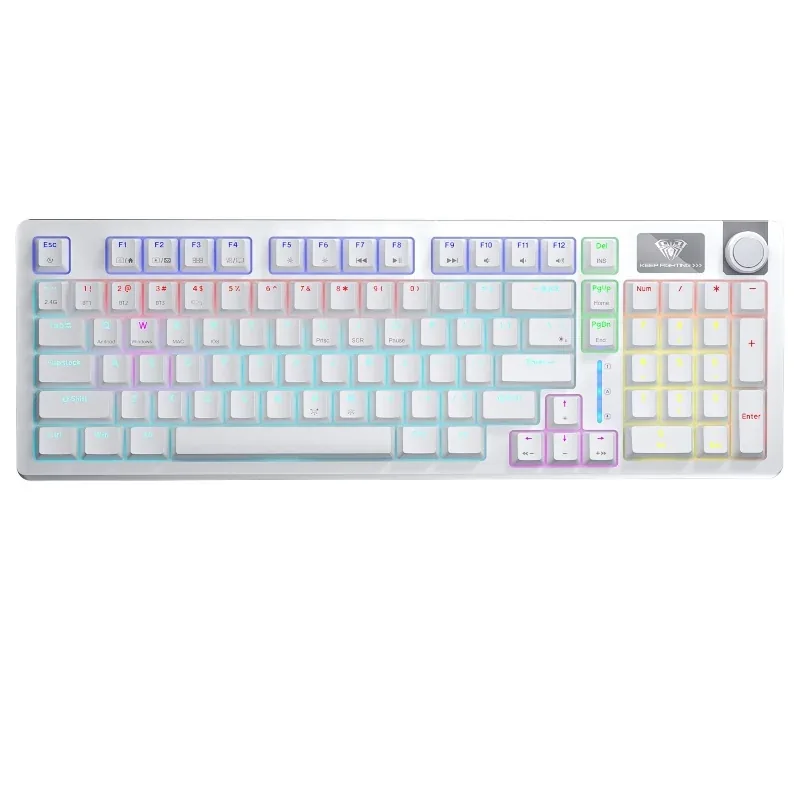
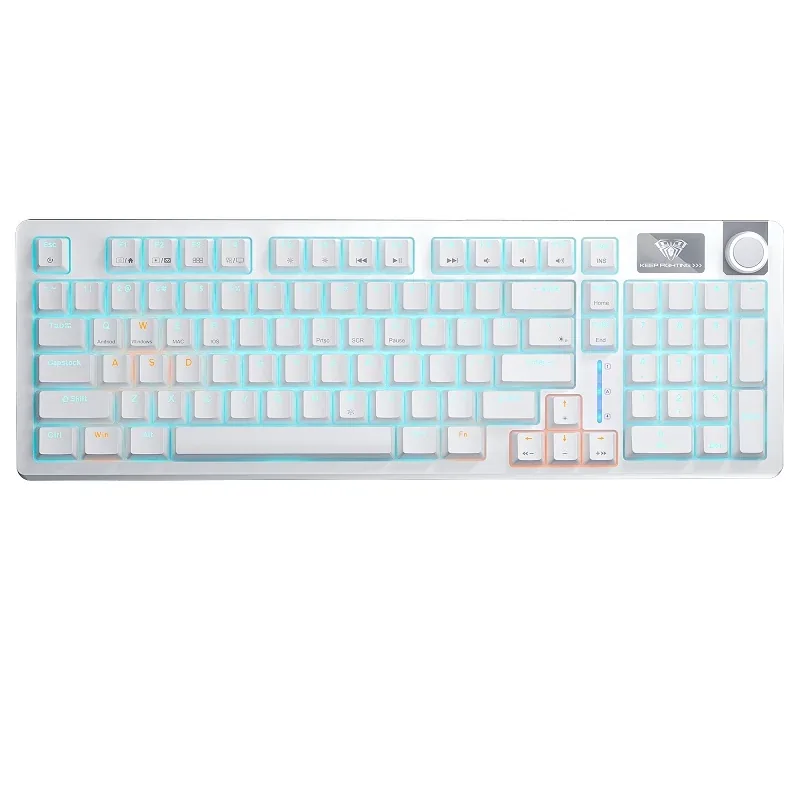
A 98% layout keeps the number pad, the arrows, the navigation keys and the function row, but drops the empty gaps between the sections. The case ends up almost four centimetres shorter than a full-size board: the mouse gets more room and your hand reaches less. Del, Home, End, PgUp and PgDn sit in their own column along the edge, easy to find by touch.

AULA S98 mechanical keyboard from above: a white body, the 98% layout with its number pad and the knob on the right
02

Gasket, cotton and a softer sound

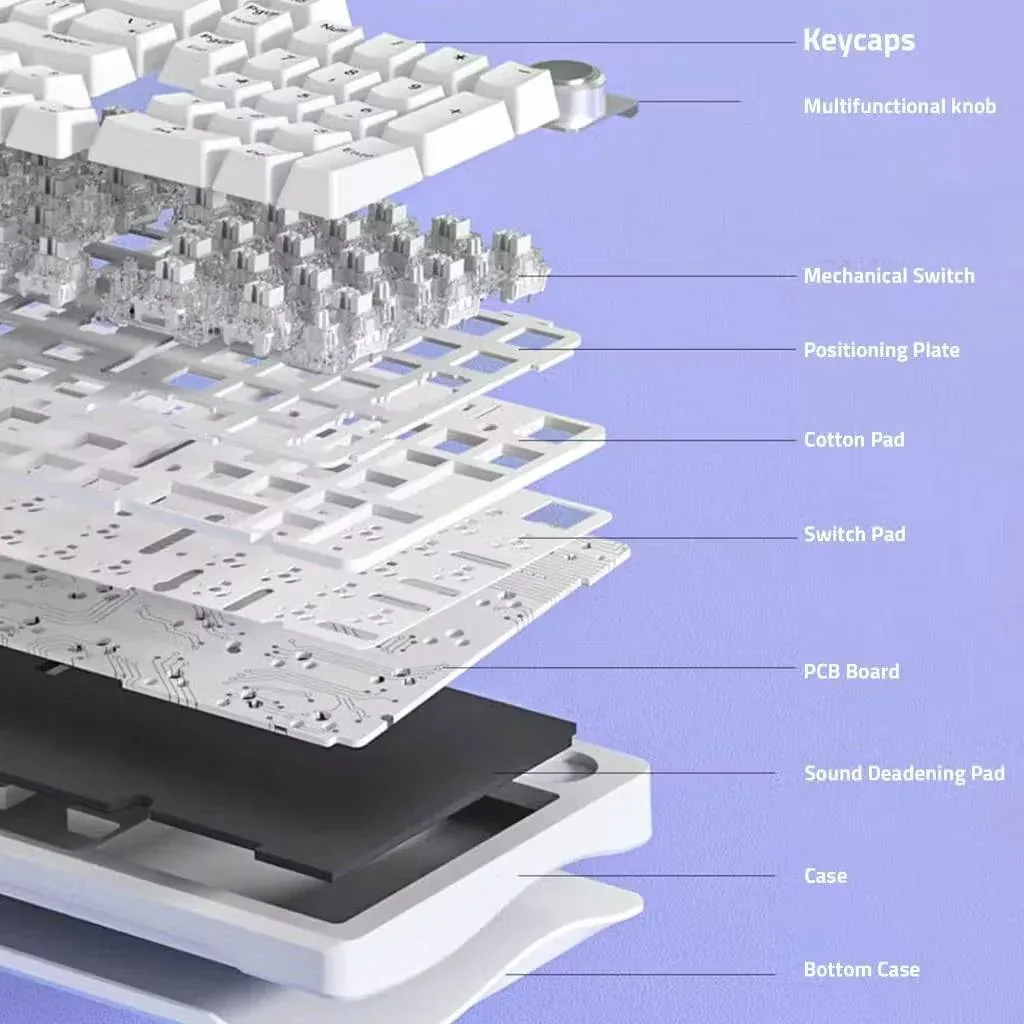
Inside the S98 the PCB is not screwed hard to the case but rests on gaskets — that is the gasket mount. A switch pad and a cotton pad sit on top of the PCB under the positioning plate, and a sound-deadening pad sits underneath it. The sandwich kills the resonance of the plastic shell: each press sounds short and dense, with no ringing left inside.

Exploded view of the AULA S98: keycaps, knob, switches, positioning plate, cotton pad, PCB and sound-dampening pad
03

Switches change without soldering

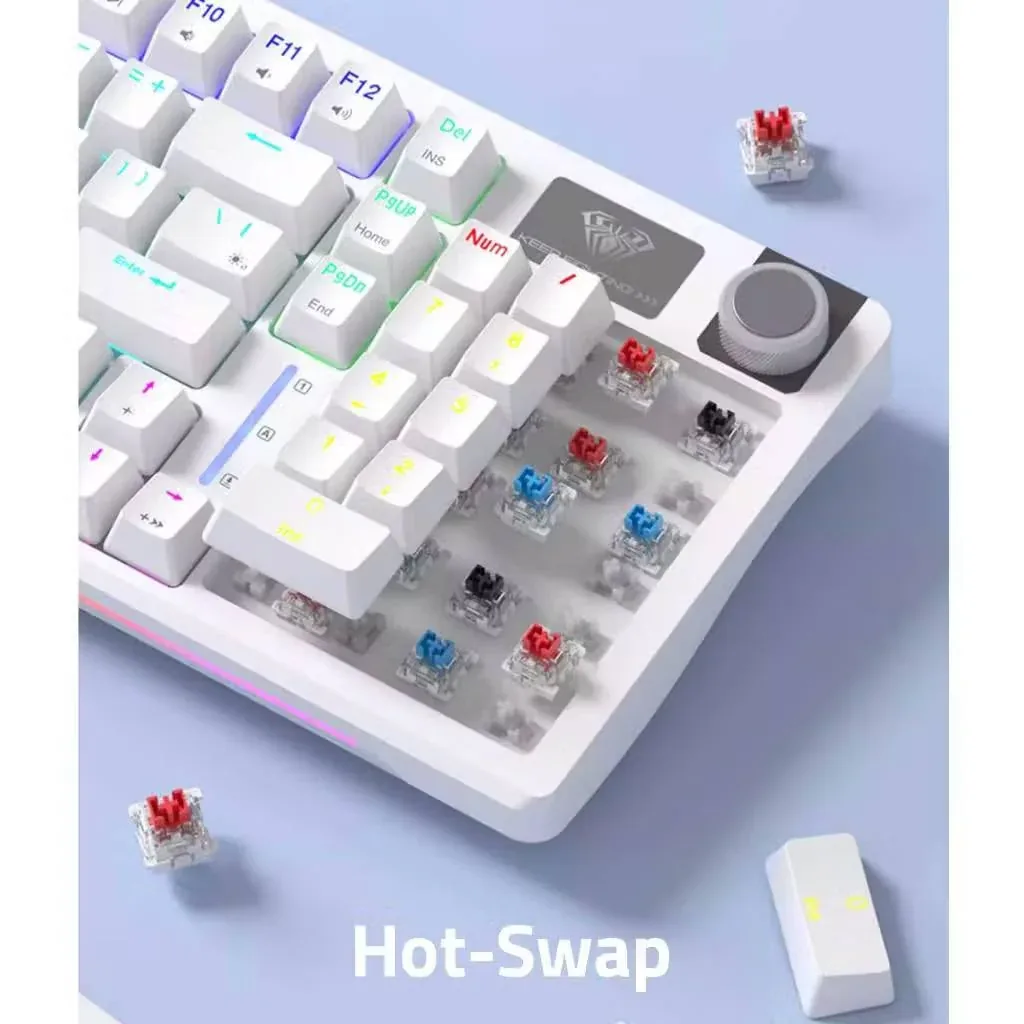
Every key is hot-swappable: a three-pin switch comes out with a puller and goes back in a second. You can start with whatever shipped in the box and later change part of the board — quieter switches on the modifiers, for example. If a single key stops registering, its switch is replaced on its own, with no work on the rest of the PCB.

Hot-swap on the AULA S98: removed keycaps and red, blue and black three-pin switches in their sockets

A knob with two personalities

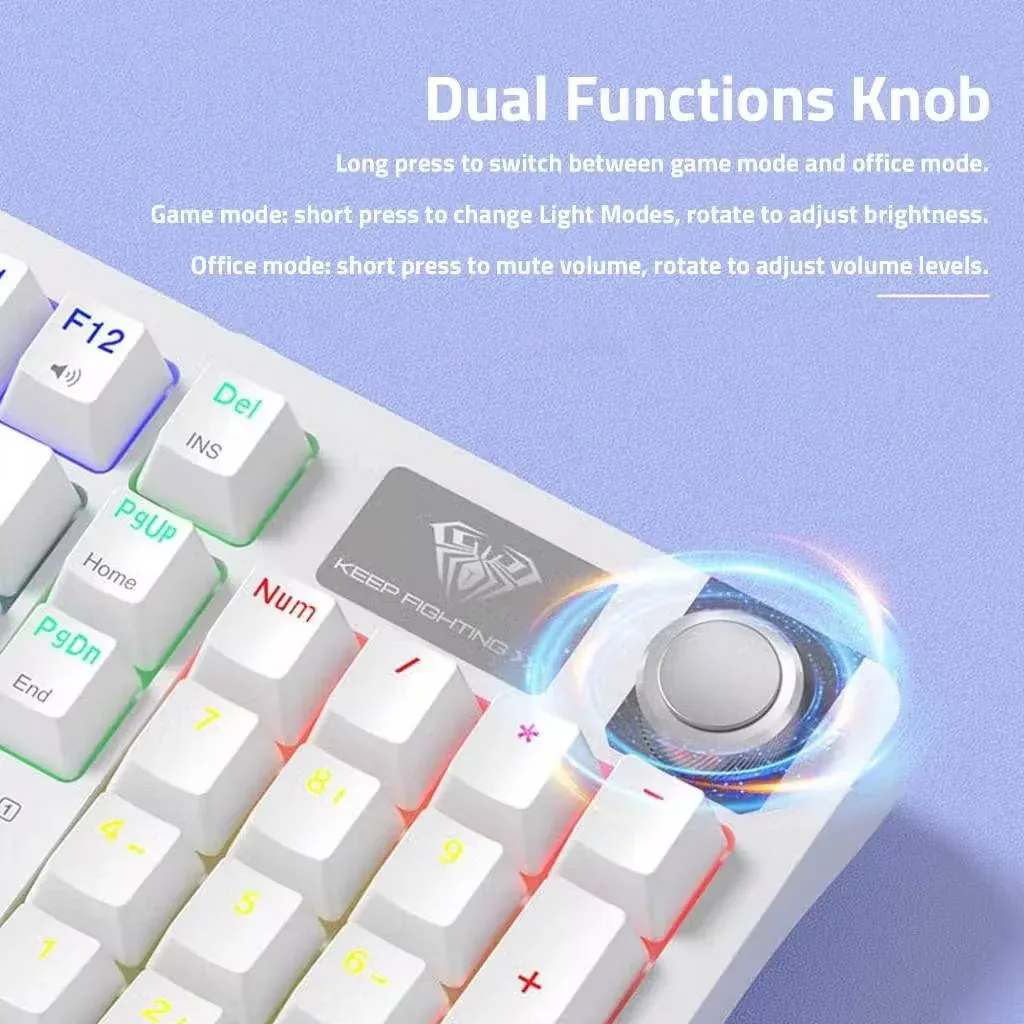
The metal knob works in two modes, and a long press switches between them. In game mode a short press cycles the lighting modes and turning it changes the brightness. In office mode a short press mutes and unmutes, and turning it sets the volume. You can switch between the two without taking your hand off the keyboard.

Close-up of the AULA S98 metal knob beside the number pad and the logo plate

Three links and 4,000 mAh

Bluetooth suits a laptop, a tablet and a phone; the 2.4 GHz link with its receiver is for gaming at the desk; the USB-C cable is there when you want zero latency or simply a top-up. The 4,000 mAh battery charges through the same port, and turning the backlight down or off stretches a charge considerably. AULA gives one explicit warning: do not use fast chargers with this keyboard.

AULA S98 from above with the rainbow backlight on: different colours by zone and the BT1, BT2, BT3 and 2.4G key legends

Specifications

AULA S98 specifications

98% of the layout, number pad included

A 98% layout keeps the number pad, the arrows, the navigation keys and the function row, but drops the empty gaps between the sections. The case ends up almost four centimetres shorter than a full-size board: the mouse gets more room and your hand reaches less. Del, Home, End, PgUp and PgDn sit in their own column along the edge, easy to find by touch.

Gasket, cotton and a softer sound

Inside the S98 the PCB is not screwed hard to the case but rests on gaskets — that is the gasket mount. A switch pad and a cotton pad sit on top of the PCB under the positioning plate, and a sound-deadening pad sits underneath it. The sandwich kills the resonance of the plastic shell: each press sounds short and dense, with no ringing left inside.

Switches change without soldering

Every key is hot-swappable: a three-pin switch comes out with a puller and goes back in a second. You can start with whatever shipped in the box and later change part of the board — quieter switches on the modifiers, for example. If a single key stops registering, its switch is replaced on its own, with no work on the rest of the PCB.

A knob with two personalities

The metal knob works in two modes, and a long press switches between them. In game mode a short press cycles the lighting modes and turning it changes the brightness. In office mode a short press mutes and unmutes, and turning it sets the volume. You can switch between the two without taking your hand off the keyboard.

Three links and 4,000 mAh

Bluetooth suits a laptop, a tablet and a phone; the 2.4 GHz link with its receiver is for gaming at the desk; the USB-C cable is there when you want zero latency or simply a top-up. The 4,000 mAh battery charges through the same port, and turning the backlight down or off stretches a charge considerably. AULA gives one explicit warning: do not use fast chargers with this keyboard.

This product is ordered in. Delivery is expected on 18 November 2026. GEEKSHOP confirms stock, the final price and delivery. This information is not a public offer.

Model specifications: the official AULA site
Format
98%, 96 keys
Connection
Bluetooth, 2.4 GHz, USB-C
Build
gasket mount, hot-swap
Switches
Blue or Red, your choice
Battery
4,000 mAh
Dimensions
406.6 × 137.9 × 45.1 mm
Type
mechanical keyboard, three connection modes
Layout
98%, with a number pad
Number of keys
96
Wireless
Bluetooth and 2.4 GHz with a receiver
Wired
USB-C cable (also used for charging)
Connected devices
3 over Bluetooth (BT1–BT3) + 2.4 GHz + cable
Supported systems
Windows, macOS, iOS, Android (Fn+W / Fn+E / Fn+Q)
Hot-swap
yes, every key, three-pin switches
Dampening
a cotton layer and a sound-dampening pad
Total key travel
4.0 mm
Keycaps
ABS plastic
Backlight
rainbow, plus a lit strip along the front edge of the case
Knob
two modes: game (brightness and effects) and office (volume)
Weight
about 829 g without cable and receiver, about 864 g with them

In the box

  • AULA S98 keyboard
  • 2.4 GHz receiver
  • USB-C cable
  • Manual and function card

Questions

The short answers.

When is delivery expected?

Delivery is expected on 18 November 2026. A pre-order locks the price and your place in the batch; GEEKSHOP confirms the exact date.

Which switches can I choose?

The supplier offers the S98 with Blue or Red switches at the same price. Blue clicks and has a clear tactile step that the whole room hears; Red is linear, with no step, and noticeably quieter. Which one you get is settled with the GEEKSHOP manager when the preorder is confirmed, and any switch can be swapped yourself later.

How do I switch between a phone and a computer?

A mode switch on the case picks Bluetooth, 2.4 GHz or cable. In Bluetooth the keyboard remembers several devices: pairing starts with a long press of Fn+1 (about three seconds, until the indicator flashes blue quickly), and the same shortcut then selects a device. There are three Bluetooth slots in all, labelled BT1, BT2 and BT3 on the keys themselves. For 2.4 GHz, use Fn+~ together with the bundled receiver.

Can I charge it with a fast charger?

No. AULA explicitly warns that fast chargers can damage the keyboard and recommends charging it from a computer with the original cable, including while you work. To make the battery last longer in wireless mode, turn the backlight brightness down or switch it off.

This is a preorder — how long is the wait?

Preorders open on 18 November 2026. Delivery takes about a month from the moment a GEEKSHOP manager confirms the order; the same manager will tell you the exact timing, the switches available and what is in the batch.

Who confirms the price, stock and delivery?

GEEKSHOP confirms stock, the final price and delivery. The information on this site is not a public offer.

How do I order?

Add products to the cart and send the order — it opens in Telegram with a GeekShop manager, who confirms stock, the final price and timing. Nothing is paid on the site.

How much is delivery?

Delivery anywhere in Uzbekistan costs 50,000 UZS. The manager gives the timing when confirming the order.

How to buy

Three presses to your AULA.

Message on Telegram@geekshop_manager
  1. Cart

    Build the order on the site — or message the manager on Telegram straight away.

  2. Confirmation

    The order goes to GeekShop: a manager confirms stock, price and timing.

  3. Delivery

    Anywhere in Uzbekistan — 50,000 UZS. Payment is agreed with the manager after confirmation.

  • Orders through GEEKSHOP
  • 1-month warranty
  • Genuine, factory-sealed
  • Nothing paid on the site

Goes well with

AULA SC380 Pro
AULA SC380 Pro

Black 55g gaming mouse with PAW3311 and tri-mode connectivity

55 g and a PAW3311 sensor · Cable, receiver or Bluetooth · 500 mAh and charging-dock support

315,000 UZS In stock
AULA SC580X
AULA SC580X

Black tri-mode gaming mouse with 10–12K DPI and 6 programmable buttons

Solid shell, around 82 g · Three modes for desktop and laptop · Up to 1000 Hz and a 500 mAh battery

273,000 UZS In stock
AULA SC590 Pro
AULA SC590 Pro

Black 64g gaming mouse with PAW3311, 20K DPI and Smart Display

Mouse status on its display · Compact solid shell, about 64 g · Three connections and adjustable DPI

304,500 UZS In stock
AULA SC620
AULA SC620

Black 67g gaming mouse with PAW3311, 12K DPI and tri-mode

Honeycomb shell, 67 g · PAW3311 and accessible side buttons · 400 mAh and three ways to connect

262,500 UZS In stock
Full catalog

Your cart

Nothing here yet. Press any key — in the catalog.

Full catalog