AULA S2022 — 1

AULA S2022mechanical keyboard

AULA S2022 — mechanical keyboard.

Full-size mechanical — with the sound you choose

A full-size 104-key mechanical keyboard with 20 backlight effects and a 1.6 m cable.

Version Black · Red Switch
175,000 UZS Pre-order

Expected: 18 November

Ordered in for you — GEEKSHOP confirms the exact date

Pre-order — no payment now. A GEEKSHOP manager will contact you to confirm availability, the delivery date and payment.

Price and stock come live from GeekShop

  • 104 keys
  • 60M key rating
  • 20 lighting effects
  • 1.6m cable length

Why people pick it

What you get

01

Full size, with nothing reinvented

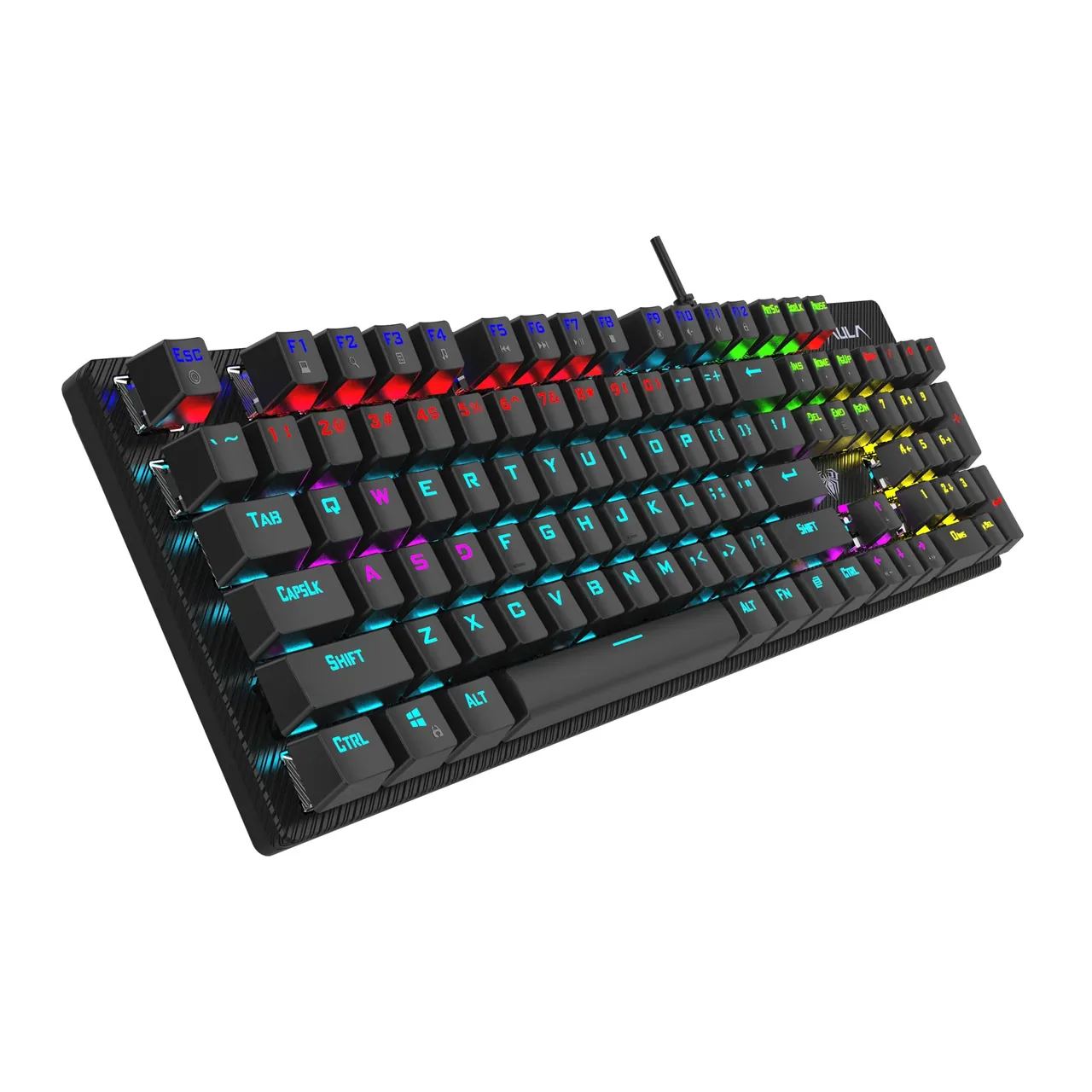
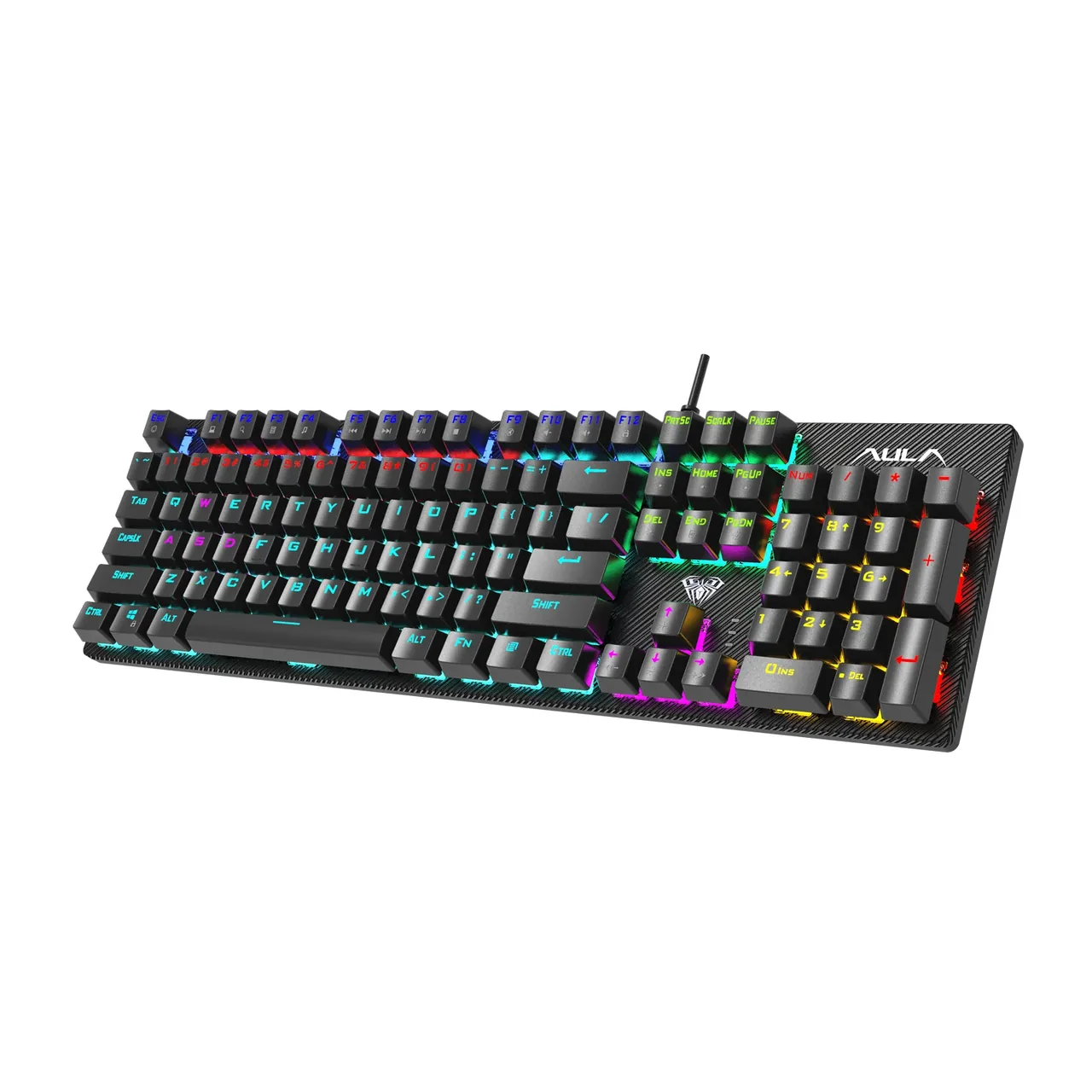
The S2022 is the classic 104 keys in a US layout: the F1–F12 row, the number pad on the right, the full navigation block and the arrows where you expect them. The 435 × 125 × 38 mm case is built for a permanent desk, and the roughly 1.6-metre cable reaches a tower on the floor without strain. Nothing needs configuring before the first use — the system picks the keyboard up straight away.

The AULA S2022 mechanical keyboard in black at three quarters: 104 keys and multi-colour backlighting
02

Stepped rows and keys in plain sight

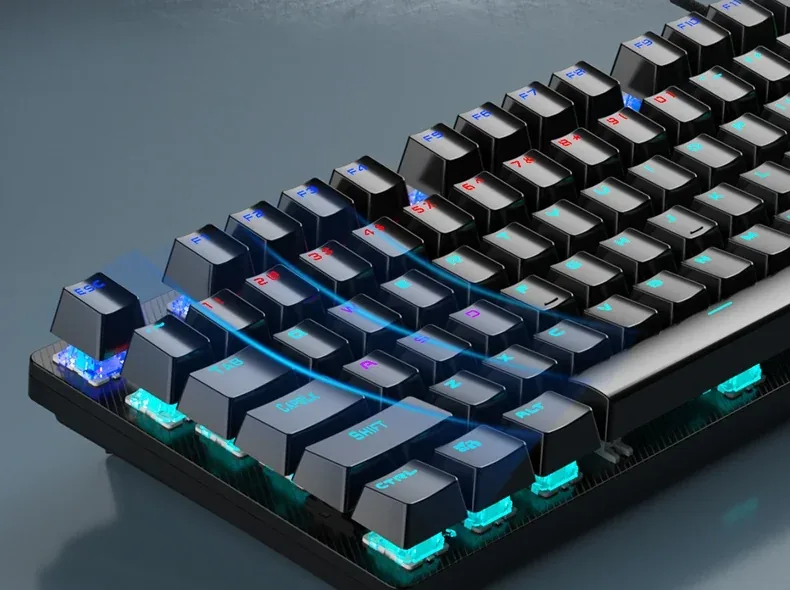
The top plate is exposed: the caps stand above it rather than sinking into the case. Light therefore escapes through the legends and from under the keys, and crumbs brush off the surface instead of collecting in wells. The rows are stepped at different heights — further rows higher, nearer rows lower — so your hand reaches the F row and the numbers without lifting the wrist.

The stepped row profile of the AULA S2022 from the side: keys at different heights above the exposed plate
03

Blue or Red: click versus quiet

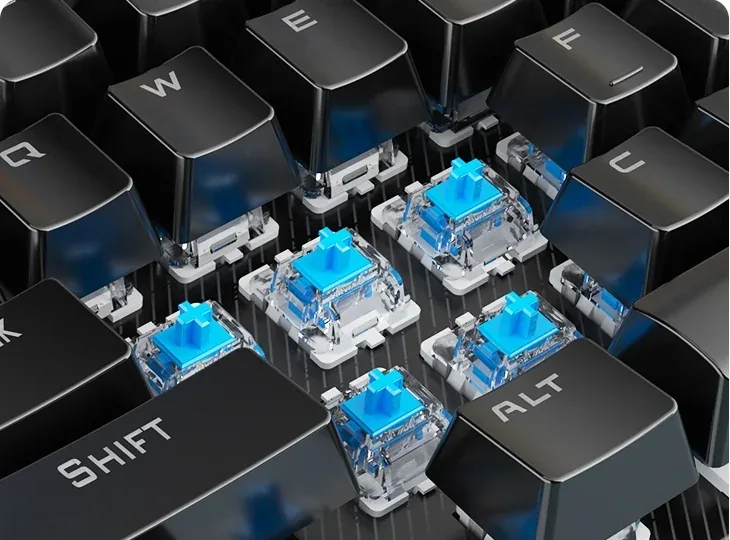
AULA offers the S2022 with two switches that share the same 60 ± 10 g force and the same rating of about 60 million presses. Blue actuates at 2.0 mm with a crisp bump and a loud click — you hear the rhythm of your typing, which many people find helps accuracy. Red is linear: an even travel, actuation already at 1.5 mm and a noticeably quieter sound. Shooters tend to go Red; writing and the feel of "real mechanical" tend to go Blue.

Blue switches under the removed caps of the AULA S2022: clear housings and blue stems

20 lighting effects, set from the keyboard itself

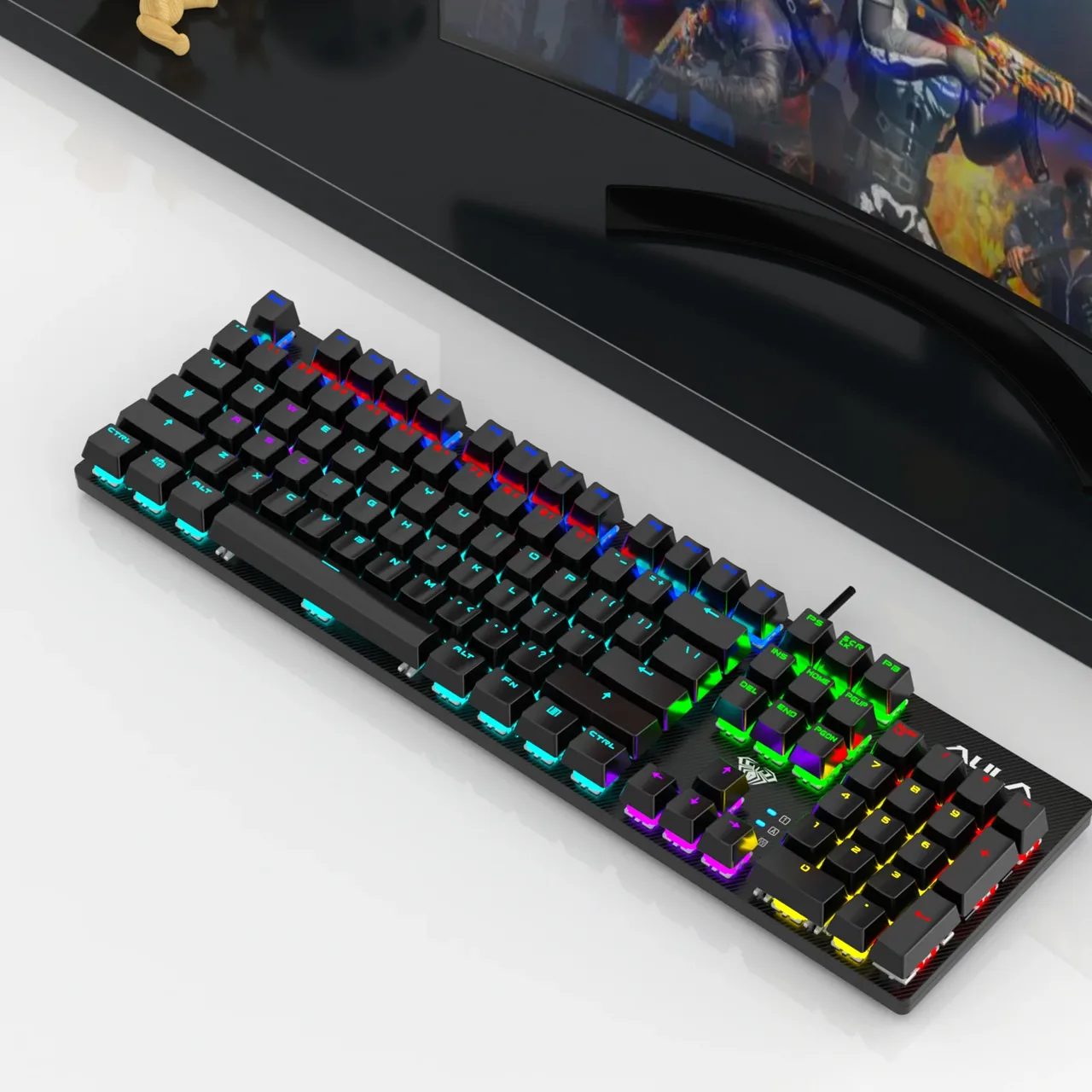
The S2022's lighting works in zones: neighbouring sections glow in different colours and the transition travels across the board as a wave. The effects are spread over Fn + Ins, Home, PgUp, Del and PgDn, each group holding several modes — from a steady glow and a breathing fade to press-reactive ripples and running waves. Fn with up and down sets brightness, left and right set speed, Fn + End starts a custom scheme and Fn + Esc brings the default back.

The AULA S2022 on a desk in front of a monitor, its keys lit in different colours

26 keys at once and the F1–F12 layer

AULA marks out a block of 26 keys on the S2022 that register together without conflicting: Tab, Q, W, E, R, T, Caps Lock, the A–G row, Shift, Z–B, M, Ctrl, Alt, the spacebar and the arrows. That is exactly the area where movement, crouch and fast combos live. The F1–F12 row doubles as a second layer through Fn: volume and mute, pause and track skipping, the calculator, search and a full keyboard lock — handy when you step away from a running machine.

The AULA S2022 from a front-left angle: stepped key rows, the exposed top plate and the USB cable

Specifications

AULA S2022 specifications

Full size, with nothing reinvented

The S2022 is the classic 104 keys in a US layout: the F1–F12 row, the number pad on the right, the full navigation block and the arrows where you expect them. The 435 × 125 × 38 mm case is built for a permanent desk, and the roughly 1.6-metre cable reaches a tower on the floor without strain. Nothing needs configuring before the first use — the system picks the keyboard up straight away.

Stepped rows and keys in plain sight

The top plate is exposed: the caps stand above it rather than sinking into the case. Light therefore escapes through the legends and from under the keys, and crumbs brush off the surface instead of collecting in wells. The rows are stepped at different heights — further rows higher, nearer rows lower — so your hand reaches the F row and the numbers without lifting the wrist.

Blue or Red: click versus quiet

AULA offers the S2022 with two switches that share the same 60 ± 10 g force and the same rating of about 60 million presses. Blue actuates at 2.0 mm with a crisp bump and a loud click — you hear the rhythm of your typing, which many people find helps accuracy. Red is linear: an even travel, actuation already at 1.5 mm and a noticeably quieter sound. Shooters tend to go Red; writing and the feel of "real mechanical" tend to go Blue.

20 lighting effects, set from the keyboard itself

The S2022's lighting works in zones: neighbouring sections glow in different colours and the transition travels across the board as a wave. The effects are spread over Fn + Ins, Home, PgUp, Del and PgDn, each group holding several modes — from a steady glow and a breathing fade to press-reactive ripples and running waves. Fn with up and down sets brightness, left and right set speed, Fn + End starts a custom scheme and Fn + Esc brings the default back.

26 keys at once and the F1–F12 layer

AULA marks out a block of 26 keys on the S2022 that register together without conflicting: Tab, Q, W, E, R, T, Caps Lock, the A–G row, Shift, Z–B, M, Ctrl, Alt, the spacebar and the arrows. That is exactly the area where movement, crouch and fast combos live. The F1–F12 row doubles as a second layer through Fn: volume and mute, pause and track skipping, the calculator, search and a full keyboard lock — handy when you step away from a running machine.

This product is ordered in. Delivery is expected on 18 November 2026. GEEKSHOP confirms stock, the final price and delivery. This information is not a public offer.

Model specifications: the official AULA site

Format
full-size, 104 keys
Connection
wired, USB, a 1.6 m cable
Switches
Blue / Red
Key rating
about 60 million presses
Backlight
20 effects, zoned mixing
Dimensions
435 × 125 × 38 mm
Type
Wired mechanical keyboard
Model
S2022
Number of keys
104
Cable length
about 1.6 m
Operating systems
Windows XP / 7 / 8 / 10
Blue switch
Clicky, 2.0 mm actuation travel, 60 ± 10 g
Red switch
Linear, 1.5 mm actuation travel, 60 ± 10 g
Simultaneous presses
26 specified keys with no conflict
Keycaps
Double-shot moulded with a translucent insert; AULA states PBT
Stabilisers
Satellite type, on the long keys
Changing effects
Fn + Ins / Home / PgUp / Del / PgDn, Fn + Esc restores the default
Brightness and speed
Fn + up/down for brightness, Fn + left/right for speed
Custom lighting
Fn + End
Media layer
Fn + F1–F12: My Computer, search, calculator, player, previous and next track, play/pause, stop, mute, volume and a keyboard lock
Construction
Exposed top plate with floating keys
Row profile
Stepped, rows at different heights
Feet
Flip-out, to tilt the case
Series colourways
Obsidian Black, Sky Blue, Emerald Green, Cherry Blossom Powder
Video

Hear how it sounds.

Questions

The short answers.

When is delivery expected?

Delivery is expected on 18 November 2026. A pre-order locks the price and your place in the batch; GEEKSHOP confirms the exact date.

Which colour arrives with the preorder?

The GEEKSHOP batch is the black version (AULA calls it Obsidian Black), and that is what the product photos show. AULA's S2022 series also includes Sky Blue, Emerald Green and Cherry Blossom Powder, but the supplier's current price list does not offer them. If you want a colour version, ask the manager about it before confirming the order.

What is the difference between Blue and Red here?

Both take the same force — 60 ± 10 g — and both are rated at about 60 million presses. The difference is in character: Blue actuates at 2.0 mm with a clear bump and a loud click, Red is linear, actuates at 1.5 mm and sounds quieter. For a shared room or video calls pick Red; for gaming at home and for typing many people prefer Blue. The Red version is the cheaper of the two in our price list.

Do all keys register at the same time?

AULA specifies 26 designated keys at once on the S2022, not all 104. The set covers Tab, Q, W, E, R, T, Caps Lock, the A–G row, Shift, Z–B, M, Ctrl, Alt, the spacebar and the arrows — the whole left-hand gaming area plus movement control. If you need full key rollover across every key, look at the S100 or S100 Pro.

When does the keyboard arrive and how does the preorder work?

The model is sold on preorder: order taking opens on 18 November 2026. A GEEKSHOP manager contacts you, confirms the switch option and the order, and delivery then takes about a month. There is no Tashkent stock for this item — it is brought in to order.

Who confirms the price, stock and delivery?

GEEKSHOP confirms stock, the final price and delivery. The information on this site is not a public offer.

How do I order?

Add products to the cart and send the order — it opens in Telegram with a GeekShop manager, who confirms stock, the final price and timing. Nothing is paid on the site.

How much is delivery?

Delivery anywhere in Uzbekistan costs 50,000 UZS. The manager gives the timing when confirming the order.

How to buy

Three presses to your AULA.

Message on Telegram@geekshop_manager
  1. Cart

    Build the order on the site — or message the manager on Telegram straight away.

  2. Confirmation

    The order goes to GeekShop: a manager confirms stock, price and timing.

  3. Delivery

    Anywhere in Uzbekistan — 50,000 UZS. Payment is agreed with the manager after confirmation.

  • Orders through GEEKSHOP
  • 1-month warranty
  • Genuine, factory-sealed
  • Nothing paid on the site

Goes well with

AULA SC380 Pro
AULA SC380 Pro

Black 55g gaming mouse with PAW3311 and tri-mode connectivity

55 g and a PAW3311 sensor · Cable, receiver or Bluetooth · 500 mAh and charging-dock support

315,000 UZS In stock
AULA SC580X
AULA SC580X

Black tri-mode gaming mouse with 10–12K DPI and 6 programmable buttons

Solid shell, around 82 g · Three modes for desktop and laptop · Up to 1000 Hz and a 500 mAh battery

273,000 UZS In stock
AULA SC590 Pro
AULA SC590 Pro

Black 64g gaming mouse with PAW3311, 20K DPI and Smart Display

Mouse status on its display · Compact solid shell, about 64 g · Three connections and adjustable DPI

304,500 UZS In stock
AULA SC620
AULA SC620

Black 67g gaming mouse with PAW3311, 12K DPI and tri-mode

Honeycomb shell, 67 g · PAW3311 and accessible side buttons · 400 mAh and three ways to connect

262,500 UZS In stock
Full catalog

Your cart

Nothing here yet. Press any key — in the catalog.

Full catalog