AULA S100 Pro — 1

AULA S100 Promechanical keyboard

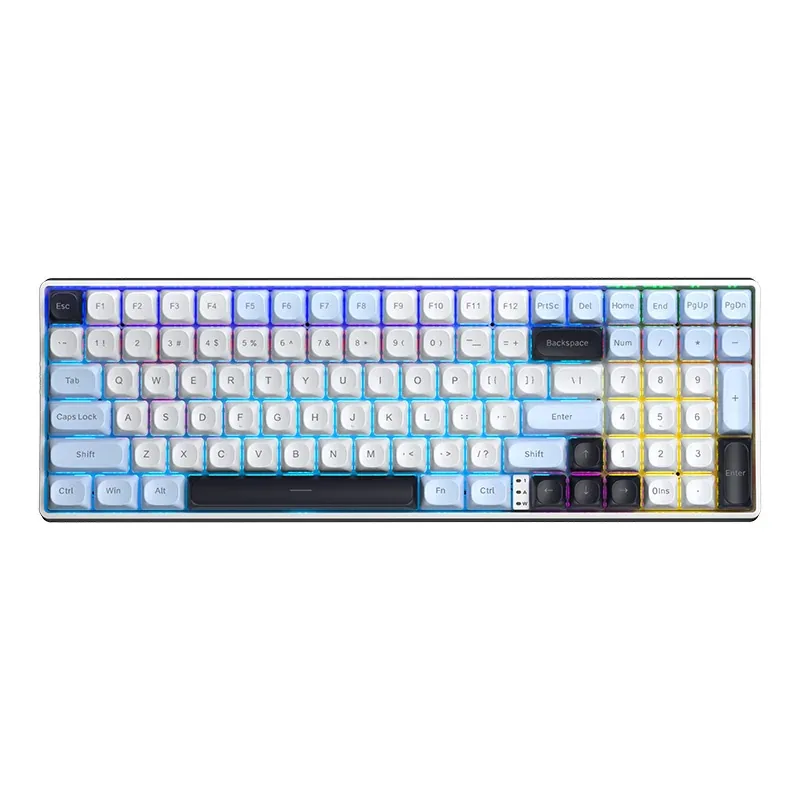
AULA S100 Pro (S100Pro) — mechanical keyboard.

Cable, 2.4 GHz or Bluetooth — one slider picks the mode

A 99-key keyboard with three connection modes, a 4,000 mAh battery and solder-free hot-swap sockets.

Version Red Switch
330,000 UZS Pre-order

Expected: 18 November

Ordered in for you — GEEKSHOP confirms the exact date

Pre-order — no payment now. A GEEKSHOP manager will contact you to confirm availability, the delivery date and payment.

Price and stock come live from GeekShop

  • 99 keys
  • 3 connection modes
  • 4000mAh battery
  • 132h runtime unlit

Why people pick it

What you get

01

Three modes and the slider that switches them

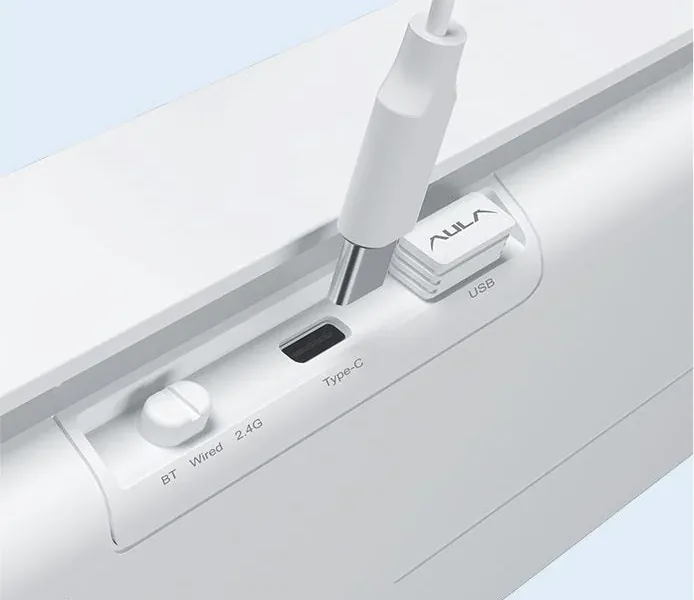
The underside carries a three-position slider: BT, Wired and 2.4G. Next to it sit the Type-C port and a recess that holds the 2.4 GHz receiver, so it does not disappear on the trip between home and the office. The receiver keeps latency low for games, Bluetooth frees the port and works with a tablet or phone, and the cable powers the board and charges the battery at once.

The AULA S100 Pro's underside: the BT / Wired / 2.4G slider, the Type-C port and the 2.4 GHz receiver in its recess
02

4,000 mAh and the honest maths of backlighting

AULA publishes two runtime figures, and the gap between them is the lighting. With the default effects the keyboard draws up to 125 mA and lasts about 32 hours. Turn off the backlight and the side light and draw falls to 30 mA, pushing runtime past 132 hours. Charging runs over Type-C at 5 V and up to 500 mA.

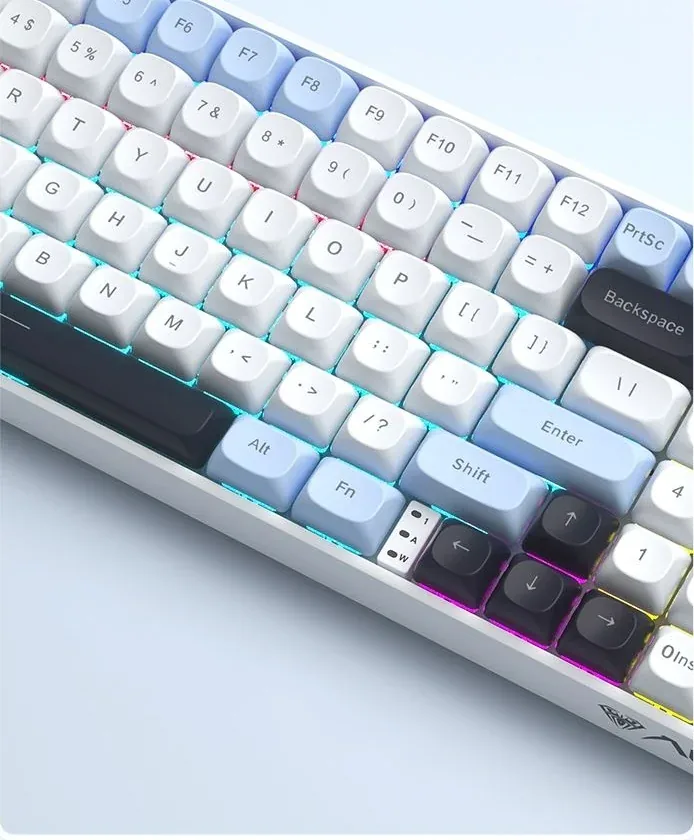
A close-up of the AULA S100 Pro's zoned lighting, with rows of caps lit in different colours
03

Hot-swap: a switch changes in a minute

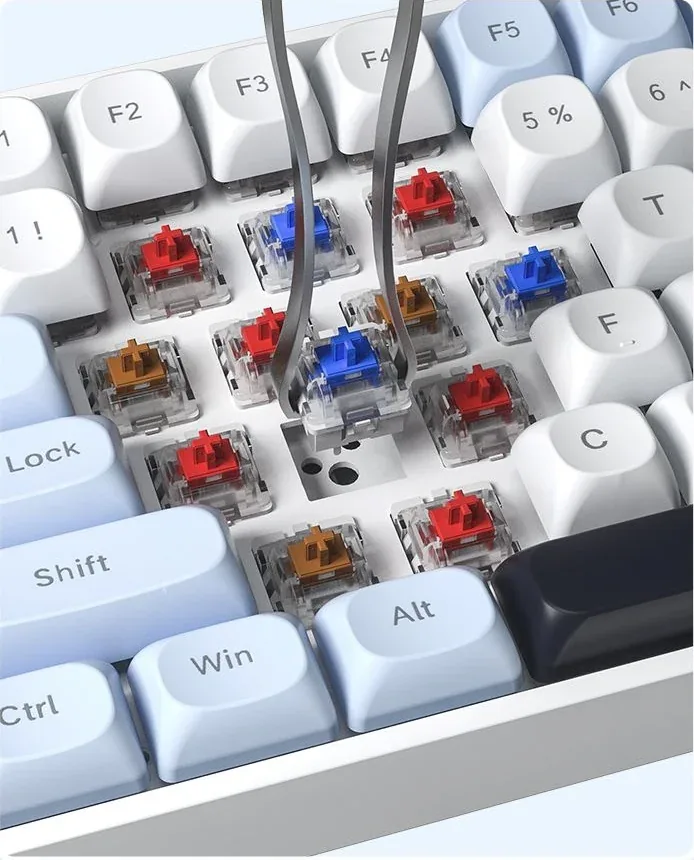
All 99 keys sit in hot-swap sockets. Pull the cap, lift the switch out with tweezers, drop another one in — no soldering iron involved. It is a way to change the sound and the force without changing the keyboard: linear for games, tactile for writing, quiet for a shared room. AULA does not list a puller in the box, so it is worth buying tweezers or a puller separately.

Hot-swap on the AULA S100 Pro: tweezers lifting a switch out of its socket beside red, blue and brown switches

What sits under the caps: plate, PCB, shell

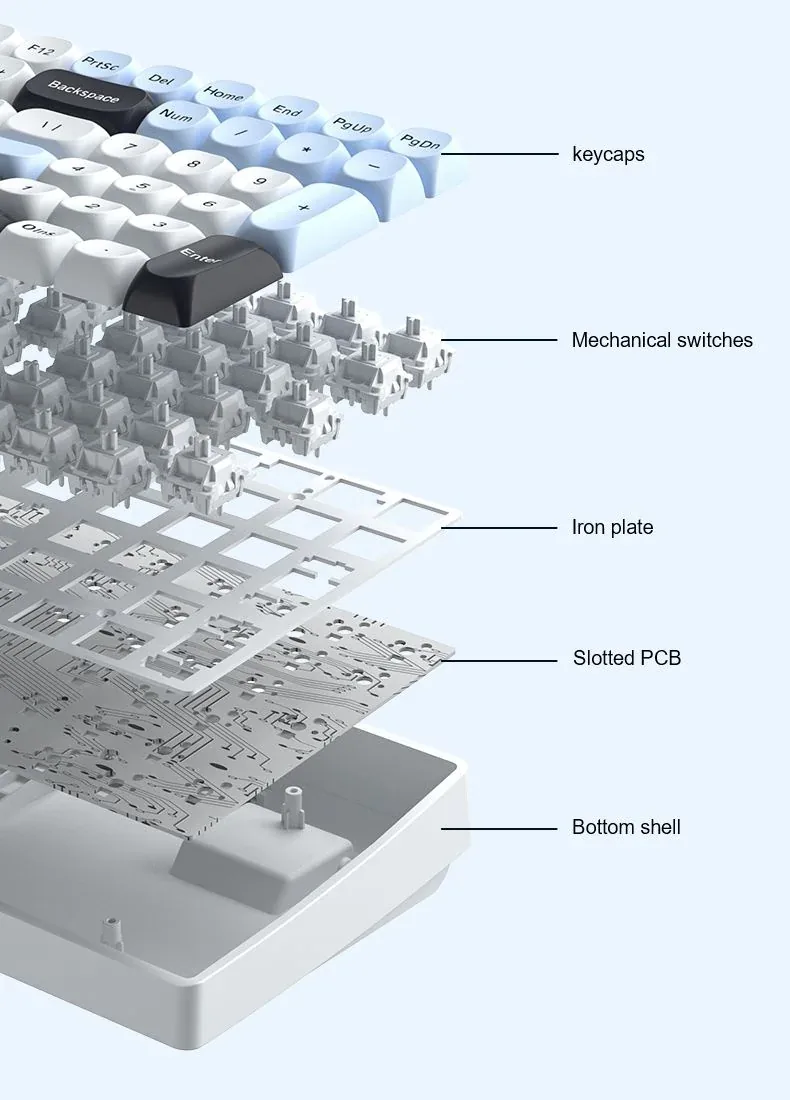
AULA publishes an exploded view of the S100 Pro: spherical PBT caps, mechanical switches, the plate, the 1.2 mm slotted PCB and the bottom shell. Both the plate and the board are cut between the rows, and that slotting lets the assembly flex slightly under a press, softening the bottom-out. The shell is double-shot moulded, which holds its shape more firmly than a painted part.

The AULA S100 Pro exploded: keycaps, switches, the plate (labelled Iron plate), the slotted PCB and the bottom shell

Zoned lighting and two levels of tilt

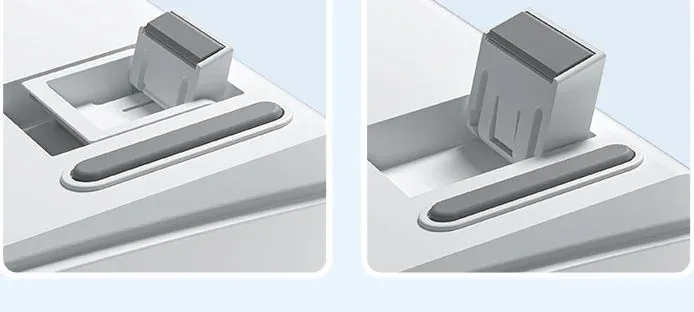
The lighting works in zones: neighbouring rows glow in different colours and a separate strip runs along the side of the case. This is not per-key addressable RGB but a mix of colours by section — AULA's renders show the gradient running from blue through pink to yellow. The feet are two-stage, so you can lift the back edge by one step or two to suit how you sit.

The AULA S100 Pro's two-stage foot shown in both positions: one step and two steps of tilt

Specifications

AULA S100 Pro specifications

Three modes and the slider that switches them

The underside carries a three-position slider: BT, Wired and 2.4G. Next to it sit the Type-C port and a recess that holds the 2.4 GHz receiver, so it does not disappear on the trip between home and the office. The receiver keeps latency low for games, Bluetooth frees the port and works with a tablet or phone, and the cable powers the board and charges the battery at once.

4,000 mAh and the honest maths of backlighting

AULA publishes two runtime figures, and the gap between them is the lighting. With the default effects the keyboard draws up to 125 mA and lasts about 32 hours. Turn off the backlight and the side light and draw falls to 30 mA, pushing runtime past 132 hours. Charging runs over Type-C at 5 V and up to 500 mA.

Hot-swap: a switch changes in a minute

All 99 keys sit in hot-swap sockets. Pull the cap, lift the switch out with tweezers, drop another one in — no soldering iron involved. It is a way to change the sound and the force without changing the keyboard: linear for games, tactile for writing, quiet for a shared room. AULA does not list a puller in the box, so it is worth buying tweezers or a puller separately.

What sits under the caps: plate, PCB, shell

AULA publishes an exploded view of the S100 Pro: spherical PBT caps, mechanical switches, the plate, the 1.2 mm slotted PCB and the bottom shell. Both the plate and the board are cut between the rows, and that slotting lets the assembly flex slightly under a press, softening the bottom-out. The shell is double-shot moulded, which holds its shape more firmly than a painted part.

Zoned lighting and two levels of tilt

The lighting works in zones: neighbouring rows glow in different colours and a separate strip runs along the side of the case. This is not per-key addressable RGB but a mix of colours by section — AULA's renders show the gradient running from blue through pink to yellow. The feet are two-stage, so you can lift the back edge by one step or two to suit how you sit.

This product is ordered in. Delivery is expected on 18 November 2026. GEEKSHOP confirms stock, the final price and delivery. This information is not a public offer.

Model specifications: the official AULA site

Layout
98%, 99 keys
Connection
Bluetooth, 2.4 GHz, Type-C
Battery
4,000 mAh, Li-ion
Battery life
from 32 h with the default lighting, from 132 h with the backlight and side light off
Switches
Red or Brown, hot-swappable
Dimensions
369.96 × 126.56 × 40.65 mm
Type
Tri-mode mechanical keyboard
Model
S100 Pro
Format
Compact full-size, a 98% layout
Number of keys
99
Mode switching
A BT / Wired / 2.4G slider on the underside
Operating systems
Windows XP / 7 / 8 / 10, Android, iOS, macOS
Rated voltage
3.7 V (4.2 V at full charge)
Charging
5 V, up to 500 mA, over Type-C
Current draw
up to 125 mA with the default lighting, up to 30 mA unlit
Hot-swap
Yes, on every key, no soldering
Simultaneous presses
Full key rollover across all keys
Keycap material
PBT, double-shot moulded
Keycap profile
Spherical (dished tops)
Weight
about 928 g without the cable and receiver, about 973 g with them
Shell
Double-shot moulded, boat-shaped profile
Plate
Slotted; polycarbonate in AULA's table, labelled Iron plate in the exploded diagram
PCB
Slotted, 1.2 mm, a socket per key
Lighting
Regional mixed light plus a separate side light
Feet
Two-stage, two typing angles

In the box

  • AULA S100 Pro keyboard
  • USB Type-C cable
  • 2.4 GHz receiver (stored in a recess in the case)

Questions

The short answers.

When is delivery expected?

Delivery is expected on 18 November 2026. A pre-order locks the price and your place in the batch; GEEKSHOP confirms the exact date.

How is the S100 Pro different from the plain S100?

The case, the 99-key layout, the PBT caps, the plate and the lighting are the same on both. The S100 Pro adds three connection modes (Bluetooth, 2.4 GHz and Type-C), a 4,000 mAh battery and hot-swap sockets on every key. The S100 is cable only, with no battery and no hot-swap.

Which colourway comes with the switch I pick?

AULA builds the S100 Pro in two colourways on a light-blue base: one with black accents, one with purple. The maker ties the colourway to the switch type, but its own table and the supplier price-list photos disagree about which goes with which, so the GEEKSHOP manager confirms the exact combination for your batch before payment.

Is this a gasket-mount keyboard?

The title of AULA's page calls the model a "Gasket Mechanical Keyboard", but the detailed specification and the exploded diagram describe a slotted polycarbonate positioning plate and a 1.2 mm slotted PCB, with no mention of gaskets between the plate and the case. We describe what the specification states and suggest not counting on a classic gasket mount.

When does the keyboard arrive and how does the preorder work?

The model is sold on preorder: order taking opens on 18 November 2026. A GEEKSHOP manager contacts you, confirms the switch and the colourway and places the order, and delivery then takes about a month. There is no Tashkent stock for this item.

Who confirms the price, stock and delivery?

GEEKSHOP confirms stock, the final price and delivery. The information on this site is not a public offer.

How do I order?

Add products to the cart and send the order — it opens in Telegram with a GeekShop manager, who confirms stock, the final price and timing. Nothing is paid on the site.

How much is delivery?

Delivery anywhere in Uzbekistan costs 50,000 UZS. The manager gives the timing when confirming the order.

How to buy

Three presses to your AULA.

Message on Telegram@geekshop_manager
  1. Cart

    Build the order on the site — or message the manager on Telegram straight away.

  2. Confirmation

    The order goes to GeekShop: a manager confirms stock, price and timing.

  3. Delivery

    Anywhere in Uzbekistan — 50,000 UZS. Payment is agreed with the manager after confirmation.

  • Orders through GEEKSHOP
  • 1-month warranty
  • Genuine, factory-sealed
  • Nothing paid on the site

Goes well with

AULA SC380 Pro
AULA SC380 Pro

Black 55g gaming mouse with PAW3311 and tri-mode connectivity

55 g and a PAW3311 sensor · Cable, receiver or Bluetooth · 500 mAh and charging-dock support

315,000 UZS In stock
AULA SC580X
AULA SC580X

Black tri-mode gaming mouse with 10–12K DPI and 6 programmable buttons

Solid shell, around 82 g · Three modes for desktop and laptop · Up to 1000 Hz and a 500 mAh battery

273,000 UZS In stock
AULA SC590 Pro
AULA SC590 Pro

Black 64g gaming mouse with PAW3311, 20K DPI and Smart Display

Mouse status on its display · Compact solid shell, about 64 g · Three connections and adjustable DPI

304,500 UZS In stock
AULA SC620
AULA SC620

Black 67g gaming mouse with PAW3311, 12K DPI and tri-mode

Honeycomb shell, 67 g · PAW3311 and accessible side buttons · 400 mAh and three ways to connect

262,500 UZS In stock
Full catalog

Your cart

Nothing here yet. Press any key — in the catalog.

Full catalog