AULA S100 — 1

AULA S100mechanical keyboard

AULA S100 — mechanical keyboard.

Full-size logic in a case one size down

A 99-key wired mechanical keyboard: the number pad stays, the case is shorter than a full-size board.

Version Grey & Black with Orange
265,000 UZS Pre-order

Expected: 18 November

Ordered in for you — GEEKSHOP confirms the exact date

Pre-order — no payment now. A GEEKSHOP manager will contact you to confirm availability, the delivery date and payment.

Price and stock come live from GeekShop

  • 99 keys
  • 98% layout
  • 1.2mm PCB thickness
  • 2 switch options

Why people pick it

What you get

01

98% instead of 100%: the digits stay, the width goes

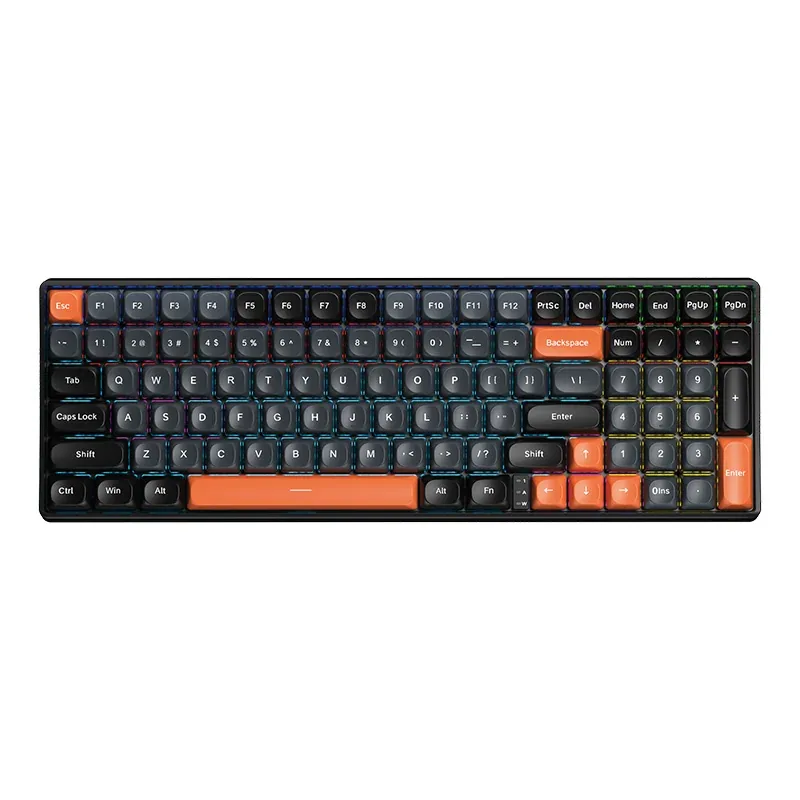
A full-size board splits into four blocks with visible gaps between them. A 98% layout closes those gaps: the function row, the navigation cluster and the number pad sit shoulder to shoulder, and the case carries 99 keys instead of 104. You still type numbers with your right hand and still reach Home, End and Page Up, but a strip of desk comes back for the mouse.

AULA S100 mechanical keyboard from above: 99 keys, grey and black caps and orange Esc, Backspace, spacebar and arrows
02

Two-tone PBT in a spherical profile

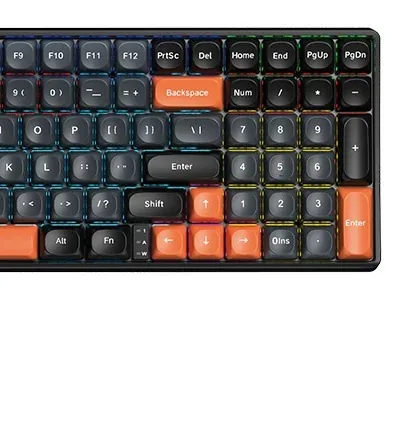
The caps are double-shot PBT: each legend is a second piece of plastic rather than printed paint, so it does not wear away with daily typing. Every keytop is dished into a sphere, which parks the fingertip in the middle of the key — something you notice over a long writing session. Esc, Backspace, the spacebar, the arrows and the numpad Enter wear orange caps, so the landmarks read in peripheral vision.

Close-up of the AULA S100's right side: the number pad, the orange Enter, the arrows and the Num, Caps and Win LEDs
03

A slotted plate and a 1.2 mm PCB

The switches sit in a positioning plate cut with slots between the rows — polycarbonate in AULA's table, over a 1.2 mm PCB that is slotted too and gives every key its own socket. Those cuts let the plate and the board flex a little under a press, so the bottom-out is softer and less of the ring carries into the case. It is the same construction as the larger S100 Pro.

Blue or Brown — pick by sound

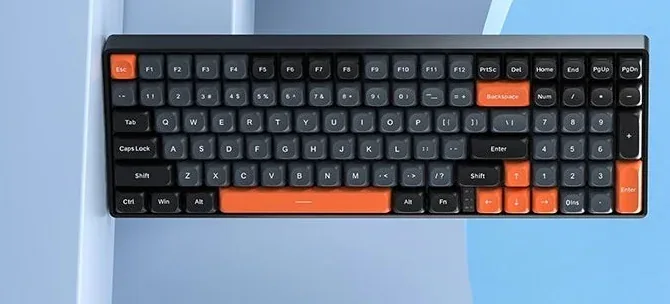
AULA ships the S100 with a choice of two switches. Blue is the classic clicky type: a crisp bump and a loud response that plays well at home and badly in a shared office. Brown keeps the same tactile bump without the click — the compromise for a desk that both games and works. Which one is in your batch is confirmed by the GEEKSHOP manager when the preorder is placed.

The AULA S100 on a light desk: the tight 98% layout with orange Esc, Backspace, spacebar and arrows

How the S100 differs from the S100 Pro

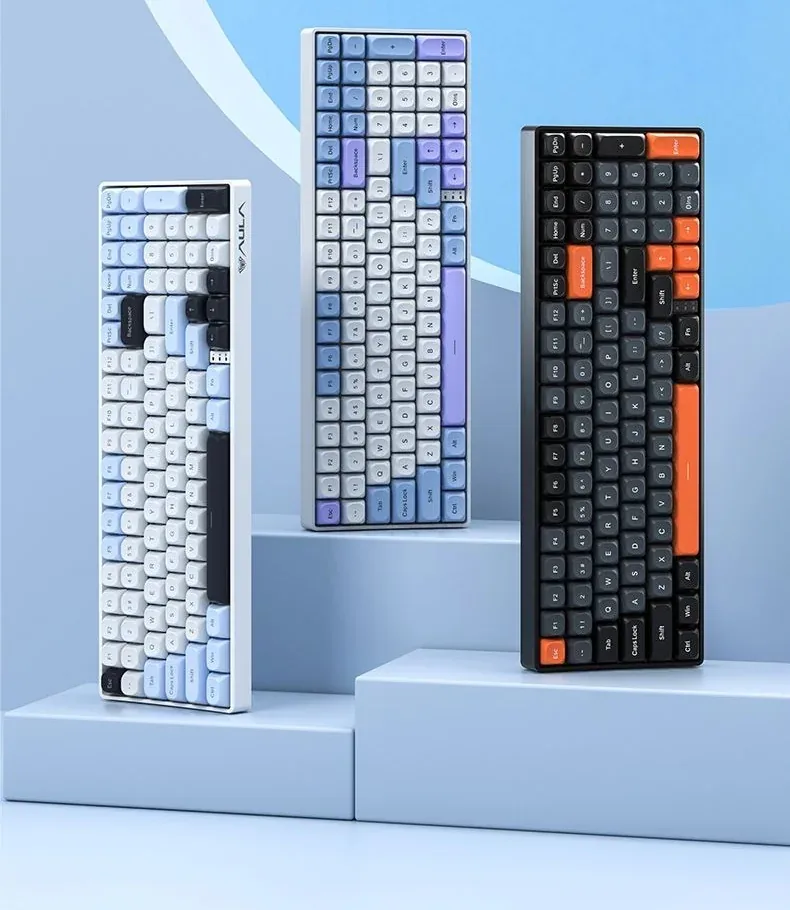
Both models are built on the same case: 99 keys, a 98% layout, spherical PBT caps, a slotted plate and zoned backlighting. The S100 Pro adds three connection modes (cable, 2.4 GHz and Bluetooth), a 4,000 mAh battery and solder-free hot-swap sockets. The S100 keeps the cable only — and costs noticeably less. If you do not need wireless, the difference in how the two feel to type on is small.

AULA's official line-up: the grey and black S100 with orange accents on the right, beside two light S100 Pro colourways

Specifications

AULA S100 specifications

98% instead of 100%: the digits stay, the width goes

A full-size board splits into four blocks with visible gaps between them. A 98% layout closes those gaps: the function row, the navigation cluster and the number pad sit shoulder to shoulder, and the case carries 99 keys instead of 104. You still type numbers with your right hand and still reach Home, End and Page Up, but a strip of desk comes back for the mouse.

Two-tone PBT in a spherical profile

The caps are double-shot PBT: each legend is a second piece of plastic rather than printed paint, so it does not wear away with daily typing. Every keytop is dished into a sphere, which parks the fingertip in the middle of the key — something you notice over a long writing session. Esc, Backspace, the spacebar, the arrows and the numpad Enter wear orange caps, so the landmarks read in peripheral vision.

A slotted plate and a 1.2 mm PCB

The switches sit in a positioning plate cut with slots between the rows — polycarbonate in AULA's table, over a 1.2 mm PCB that is slotted too and gives every key its own socket. Those cuts let the plate and the board flex a little under a press, so the bottom-out is softer and less of the ring carries into the case. It is the same construction as the larger S100 Pro.

Blue or Brown — pick by sound

AULA ships the S100 with a choice of two switches. Blue is the classic clicky type: a crisp bump and a loud response that plays well at home and badly in a shared office. Brown keeps the same tactile bump without the click — the compromise for a desk that both games and works. Which one is in your batch is confirmed by the GEEKSHOP manager when the preorder is placed.

How the S100 differs from the S100 Pro

Both models are built on the same case: 99 keys, a 98% layout, spherical PBT caps, a slotted plate and zoned backlighting. The S100 Pro adds three connection modes (cable, 2.4 GHz and Bluetooth), a 4,000 mAh battery and solder-free hot-swap sockets. The S100 keeps the cable only — and costs noticeably less. If you do not need wireless, the difference in how the two feel to type on is small.

This product is ordered in. Delivery is expected on 18 November 2026. GEEKSHOP confirms stock, the final price and delivery. This information is not a public offer.

Model specifications: the official AULA site
Layout
98%, 99 keys
Connection
wired
Switches
Blue / Brown
Keycaps
PBT, spherical profile
Backlight
zoned, multi-colour
Colour
grey, black, orange
Type
Wired mechanical keyboard
Model
S100
Format
Compact full-size, a 98% layout
Number of keys
99
Battery
None
Hot-swap
No (the S100 Pro has it)
Simultaneous presses
Full key rollover across all keys
Keycap material
PBT, double-shot moulded
Keycap profile
Spherical (dished tops)
Plate
Slotted; polycarbonate per AULA's table
PCB
Slotted, 1.2 mm, a socket per key
Body and key colour
Grey and black with orange accents
Indicators
Num, Caps and Win LEDs beside the arrows

Questions

The short answers.

When is delivery expected?

Delivery is expected on 18 November 2026. A pre-order locks the price and your place in the batch; GEEKSHOP confirms the exact date.

Does the S100 have a number pad?

Yes. This is a 99-key, 98% layout: the number pad, the arrows, Home, End, Page Up and Page Down are all there. The difference from a full-size board is that the blocks sit tight together with no wide gaps, so the case is shorter.

Can the switches be swapped without soldering?

No. Hot-swap is a Pro-only feature — in AULA's own comparison table the "full-key hot-swappable" row sits in the S100 Pro column, while the S100 lists full key rollover only. If swapping switches yourself matters, choose the S100 Pro.

Blue or Brown — which switch should I pick?

Blue clicks and gives the loudest, typewriter-like sound; Brown keeps the tactile bump but is quieter and less intrusive to the people around you. For a shared room or video calls Brown makes more sense, for gaming at home Blue does. The GEEKSHOP manager will tell you which option the current batch holds.

When does the keyboard arrive and how does the preorder work?

The model is sold on preorder: order taking opens on 18 November 2026. A GEEKSHOP manager contacts you, confirms the switch option and the order, and delivery then takes about a month. There is no Tashkent stock for this item — it is brought in to order.

Who confirms the price, stock and delivery?

GEEKSHOP confirms stock, the final price and delivery. The information on this site is not a public offer.

How do I order?

Add products to the cart and send the order — it opens in Telegram with a GeekShop manager, who confirms stock, the final price and timing. Nothing is paid on the site.

How much is delivery?

Delivery anywhere in Uzbekistan costs 50,000 UZS. The manager gives the timing when confirming the order.

How to buy

Three presses to your AULA.

Message on Telegram@geekshop_manager
  1. Cart

    Build the order on the site — or message the manager on Telegram straight away.

  2. Confirmation

    The order goes to GeekShop: a manager confirms stock, price and timing.

  3. Delivery

    Anywhere in Uzbekistan — 50,000 UZS. Payment is agreed with the manager after confirmation.

  • Orders through GEEKSHOP
  • 1-month warranty
  • Genuine, factory-sealed
  • Nothing paid on the site

Goes well with

AULA SC380 Pro
AULA SC380 Pro

Black 55g gaming mouse with PAW3311 and tri-mode connectivity

55 g and a PAW3311 sensor · Cable, receiver or Bluetooth · 500 mAh and charging-dock support

315,000 UZS In stock
AULA SC580X
AULA SC580X

Black tri-mode gaming mouse with 10–12K DPI and 6 programmable buttons

Solid shell, around 82 g · Three modes for desktop and laptop · Up to 1000 Hz and a 500 mAh battery

273,000 UZS In stock
AULA SC590 Pro
AULA SC590 Pro

Black 64g gaming mouse with PAW3311, 20K DPI and Smart Display

Mouse status on its display · Compact solid shell, about 64 g · Three connections and adjustable DPI

304,500 UZS In stock
AULA SC620
AULA SC620

Black 67g gaming mouse with PAW3311, 12K DPI and tri-mode

Honeycomb shell, 67 g · PAW3311 and accessible side buttons · 400 mAh and three ways to connect

262,500 UZS In stock
Full catalog

Your cart

Nothing here yet. Press any key — in the catalog.

Full catalog