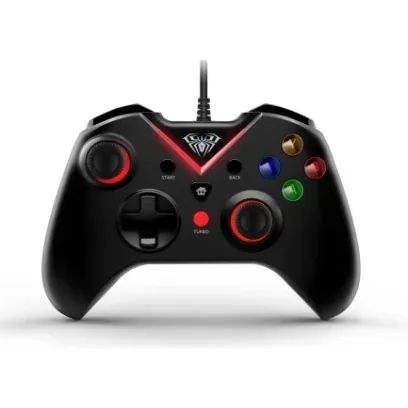
A layout you do not have to learn
The G1000 repeats the control arrangement that anyone who has held a console controller already knows: left stick top left, D-pad beneath it, right stick bottom right, four face buttons top right. Your thumbs land where they should straight away, and games almost always pick up the standard mapping on their own.
The TURBO button
A separate red button marked TURBO sits in the centre of the front panel. On gamepads that function handles auto-repeat: a held button starts firing in bursts instead of sending a single press. It helps in games where you have to press the same button often and for a long time. AULA does not publish the details for the G1000 — the repeat rate, or which buttons it can be assigned to.
A wired connection
The cable leaves the top edge and is fixed into the body. For a gamepad that is the practical option: no batteries to remember, no hunting for a charger mid-session and no re-pairing after every restart. The pad is ready the moment it is plugged in, and latency does not depend on radio quality or interference from nearby devices.
What to check before ordering
AULA publishes no detailed specification for the G1000: what is in the open is the device type and a photograph, and everything described on this page is read off those. So we do not state the connector type, the cable length, whether it has vibration, the polling rate or the weight — the spec sheet marks all of them as not stated. If you need the pad for a particular system, or vibration matters to you, message the GEEKSHOP manager: they will confirm those points and the box contents with the supplier before the preorder is confirmed.
This product is ordered in. Delivery is expected on 18 November 2026. GEEKSHOP confirms stock, the final price and delivery. This information is not a public offer.
Model specifications: the official AULA site