AULA F2023 — 1

AULA F2023keyboard

AULA F2023 — keyboard.

Metal, light and a place for your phone

A full-size membrane keyboard with a mechanical feel: 104 keys, a metal top panel, multicolour backlight and a slot for a phone.

100,000 UZS Pre-order

Expected: 18 November

Ordered in for you — GEEKSHOP confirms the exact date

Pre-order — no payment now. A GEEKSHOP manager will contact you to confirm availability, the delivery date and payment.

Price and stock come live from GeekShop

  • 104keys full layout
  • 26keys conflict-free presses
  • 562g body weight

Why people pick it

What you get

01

Metal on top, keys above the plate

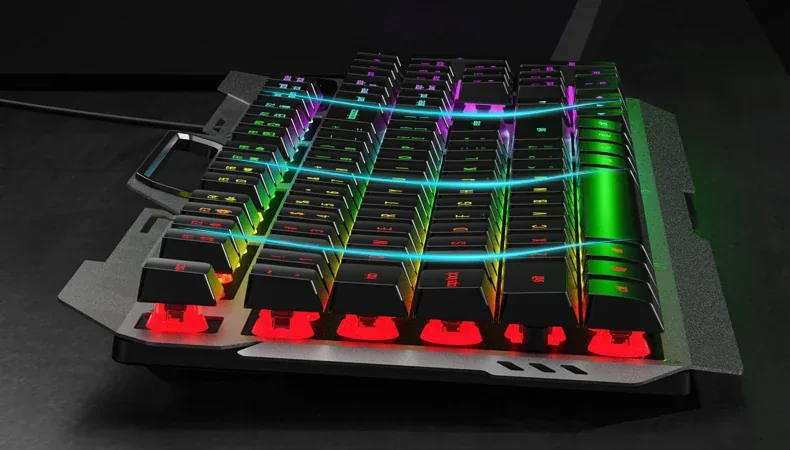
The F2023's top panel is metal, so the case barely twists under hard presses and holds its shape even when lifted. The keycaps sit above the plate, which spreads the light along the rows and outlines the layout, while crumbs and dust wipe off the base without opening anything. The rigid base and the raised caps are what give the board the response AULA calls "mechanical feeling".

Close-up of the AULA F2023 from the side: keycaps raised above the metal plate with light along the rows
02

The phone stands in the keyboard itself

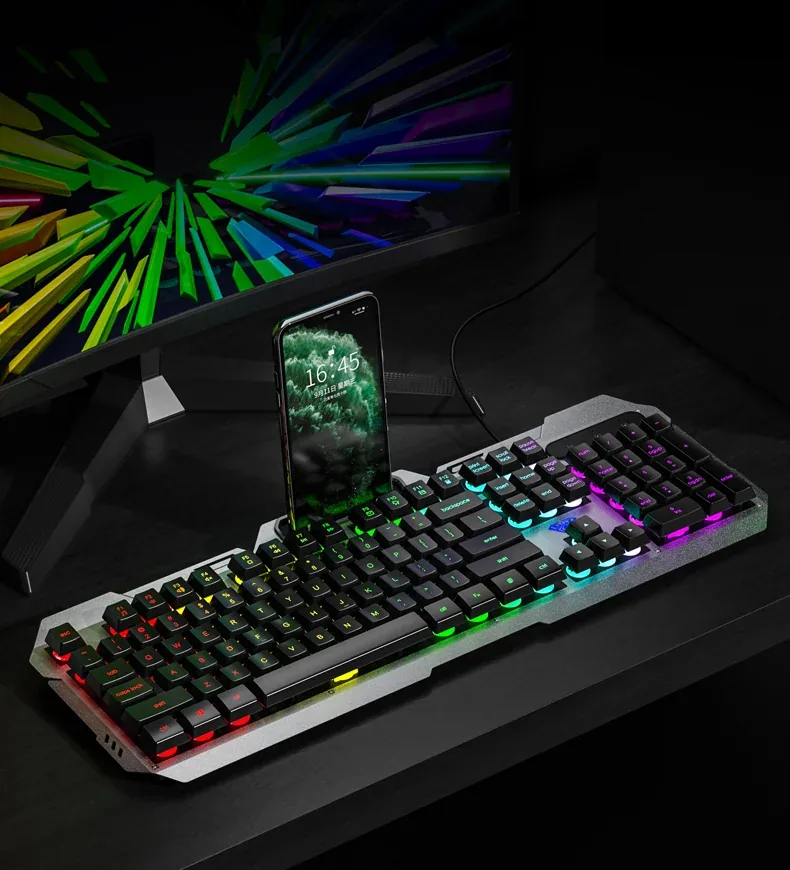
A slot runs across the top of the case: a phone or a small tablet stands upright just behind the F-row. The screen stays at eye level, a stream or a chat is readable without looking down, and the desk is free of an extra stand. The slot does not get in the way of typing — it sits above the keys and leaves the usual hand angle unchanged.

AULA F2023 on a desk: a phone standing in the top-panel slot with the key lighting on
03

26 keys that register together

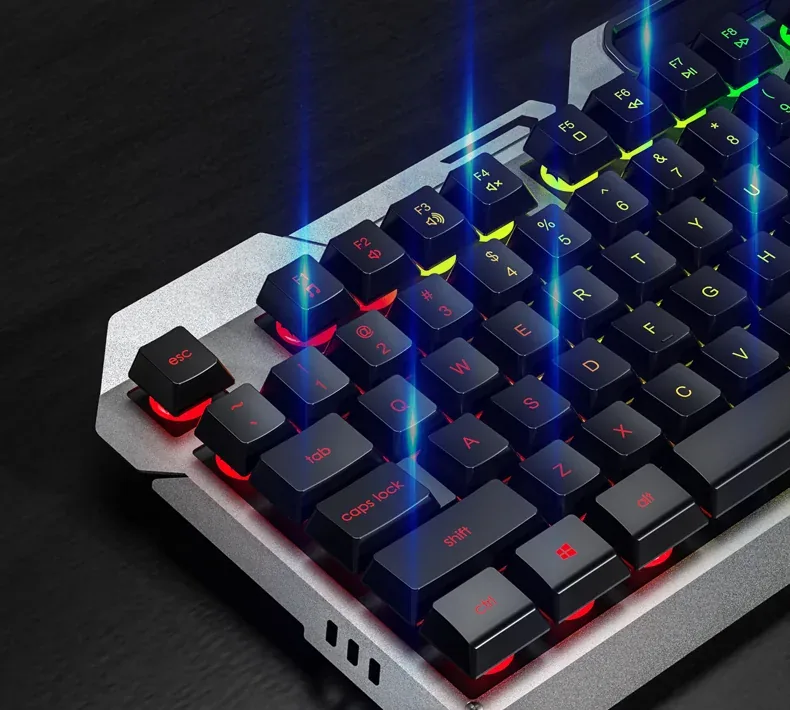
Games rarely use one key at a time: movement, crouch, reload and a quick slot all reach the system together. The F2023 resolves 26 keys without conflicts — enough to cover the WASD zone with every modifier and the neighbouring rows. Fn + Win switches the Windows key off so a stray press cannot minimise the game.

Close-up of the left side of the AULA F2023: the esc key, the F1–F8 row and the lit QWERTY block

Lighting and media without software

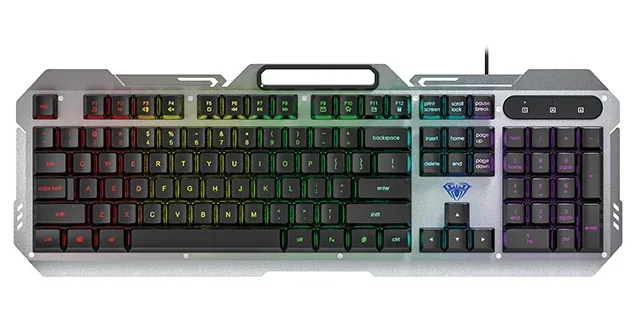
Everything is controlled from the keyboard itself. Fn + 1 cycles steady, breathing and heartbeat lighting, while Fn + PgUp and Fn + PgDn change brightness and effect speed. With Fn, the F1–F8 row handles the player, volume, mute and track skipping, and F9–F12 open email, the home page, My Computer and the calculator. Nothing has to be installed: the keyboard works as soon as it is plugged in.

AULA F2023 keyboard from above: a silver metal panel, black keycaps and multicolour RGB lighting

Specifications

AULA F2023 specifications

Metal on top, keys above the plate

The F2023's top panel is metal, so the case barely twists under hard presses and holds its shape even when lifted. The keycaps sit above the plate, which spreads the light along the rows and outlines the layout, while crumbs and dust wipe off the base without opening anything. The rigid base and the raised caps are what give the board the response AULA calls "mechanical feeling".

The phone stands in the keyboard itself

A slot runs across the top of the case: a phone or a small tablet stands upright just behind the F-row. The screen stays at eye level, a stream or a chat is readable without looking down, and the desk is free of an extra stand. The slot does not get in the way of typing — it sits above the keys and leaves the usual hand angle unchanged.

26 keys that register together

Games rarely use one key at a time: movement, crouch, reload and a quick slot all reach the system together. The F2023 resolves 26 keys without conflicts — enough to cover the WASD zone with every modifier and the neighbouring rows. Fn + Win switches the Windows key off so a stray press cannot minimise the game.

Lighting and media without software

Everything is controlled from the keyboard itself. Fn + 1 cycles steady, breathing and heartbeat lighting, while Fn + PgUp and Fn + PgDn change brightness and effect speed. With Fn, the F1–F8 row handles the player, volume, mute and track skipping, and F9–F12 open email, the home page, My Computer and the calculator. Nothing has to be installed: the keyboard works as soon as it is plugged in.

This product is ordered in. Delivery is expected on 18 November 2026. GEEKSHOP confirms stock, the final price and delivery. This information is not a public offer.

Model specifications: the official AULA site
Type
membrane, wired
Keys
104, full size
Lighting
multicolour, three modes
Top panel
metal
Dimensions
457 × 160.17 × 28.2 mm
Weight
562 g
Keyboard type
Wired gaming keyboard, membrane switches
Number of keys
104, with a number pad and arrows
Connection
USB-A cable
Lighting modes
Steady, breathing, heartbeat (Fn + 1)
Lighting adjustment
Brightness and speed: Fn + PgUp / Fn + PgDn
Colour selection
AULA documents three effects, brightness and speed only — no colour change is claimed
Keycap moulding
Dual-colour injection, light-transmitting (per AULA)
Row profile
Stepped: rows at different heights
Phone holder
A slot in the top of the case
Simultaneous presses
26 keys without conflicts
Media via Fn
Player, volume −/+, mute, play/stop, previous and next track
Shortcuts
Fn + F9–F12: email, home page, My Computer, calculator
Windows lock
Fn + Win
Operating systems
Windows XP / 7 / 8 / 10 (per AULA)
Drivers
Not required — lighting and Fn work from the keyboard itself

Questions

The short answers.

When is delivery expected?

Delivery is expected on 18 November 2026. A pre-order locks the price and your place in the batch; GEEKSHOP confirms the exact date.

Is this a mechanical keyboard?

No. The F2023 is a membrane keyboard that AULA positions as a model with a "mechanical feeling": floating keycaps and a rigid metal panel. The switches are not swappable and it is quieter than a mechanical board, but it costs considerably less and feels softer to press.

What is the difference between the two backlight versions?

The supplier offers the F2023 in two backlight executions — "backlight for gap" and "backlight for layout", the second one more expensive. AULA does not explain the difference in its public materials, so check the exact look of the lighting with the GEEKSHOP manager when the preorder is confirmed. Everything else is identical between the two.

Will the keyboard fit on a small desk?

The case is 457 mm long and 160 mm deep — a full-size keyboard with a number pad. Leave about 50 cm of width plus room on the right for a mouse. At 562 g it stays put on the desk yet is easy to move aside.

How does the preorder work?

The model is sold on preorder: you place a request, the GEEKSHOP manager confirms it and adds the item to the next shipment. After the order is confirmed, delivery takes about a month — the manager gives exact dates when the order is placed.

Who confirms the price, stock and delivery?

GEEKSHOP confirms stock, the final price and delivery. The information on this site is not a public offer.

How do I order?

Add products to the cart and send the order — it opens in Telegram with a GeekShop manager, who confirms stock, the final price and timing. Nothing is paid on the site.

How much is delivery?

Delivery anywhere in Uzbekistan costs 50,000 UZS. The manager gives the timing when confirming the order.

How to buy

Three presses to your AULA.

Message on Telegram@geekshop_manager
  1. Cart

    Build the order on the site — or message the manager on Telegram straight away.

  2. Confirmation

    The order goes to GeekShop: a manager confirms stock, price and timing.

  3. Delivery

    Anywhere in Uzbekistan — 50,000 UZS. Payment is agreed with the manager after confirmation.

  • Orders through GEEKSHOP
  • 1-month warranty
  • Genuine, factory-sealed
  • Nothing paid on the site

Goes well with

AULA SC380 Pro
AULA SC380 Pro

Black 55g gaming mouse with PAW3311 and tri-mode connectivity

55 g and a PAW3311 sensor · Cable, receiver or Bluetooth · 500 mAh and charging-dock support

315,000 UZS In stock
AULA SC580X
AULA SC580X

Black tri-mode gaming mouse with 10–12K DPI and 6 programmable buttons

Solid shell, around 82 g · Three modes for desktop and laptop · Up to 1000 Hz and a 500 mAh battery

273,000 UZS In stock
AULA SC590 Pro
AULA SC590 Pro

Black 64g gaming mouse with PAW3311, 20K DPI and Smart Display

Mouse status on its display · Compact solid shell, about 64 g · Three connections and adjustable DPI

304,500 UZS In stock
AULA SC620
AULA SC620

Black 67g gaming mouse with PAW3311, 12K DPI and tri-mode

Honeycomb shell, 67 g · PAW3311 and accessible side buttons · 400 mAh and three ways to connect

262,500 UZS In stock
Full catalog

Your cart

Nothing here yet. Press any key — in the catalog.

Full catalog