AULA AG60 Max — 1

AULA AG60 Maxmagnetic keyboard

AULA AG60 Max (AG60Max) — magnetic keyboard.

The top AG60 build: aluminium and 0.08 ms response

The top AULA AG60 build: a solid CNC aluminium chassis, magnetic switches, 8000 Hz polling and tuning through the web driver.

Version Firefly Red · Frostcore
2,220,000 UZS Pre-order

Expected: 18 November

Ordered in for you — GEEKSHOP confirms the exact date

Pre-order — no payment now. A GEEKSHOP manager will contact you to confirm availability, the delivery date and payment.

Price and stock come live from GeekShop

  • 8000Hz polling rate
  • 0.08ms response in Max mode
  • 61keys keys, 60% layout
  • 5layers dampening layers

Why people pick it

What you get

01

The top configuration in the AG60 family

AULA builds the AG60 in three versions, and Max is the highest. The AG60 page states it plainly: the base AG60 uses a single-LED per-key PCB, while the Pro and Max builds use a dual-LED one. The same page quotes average latency of 0.1 ms in Pro mode and 0.08 ms in Max mode. In practice you choose Max not for a different shell but for the top electronics and firmware.

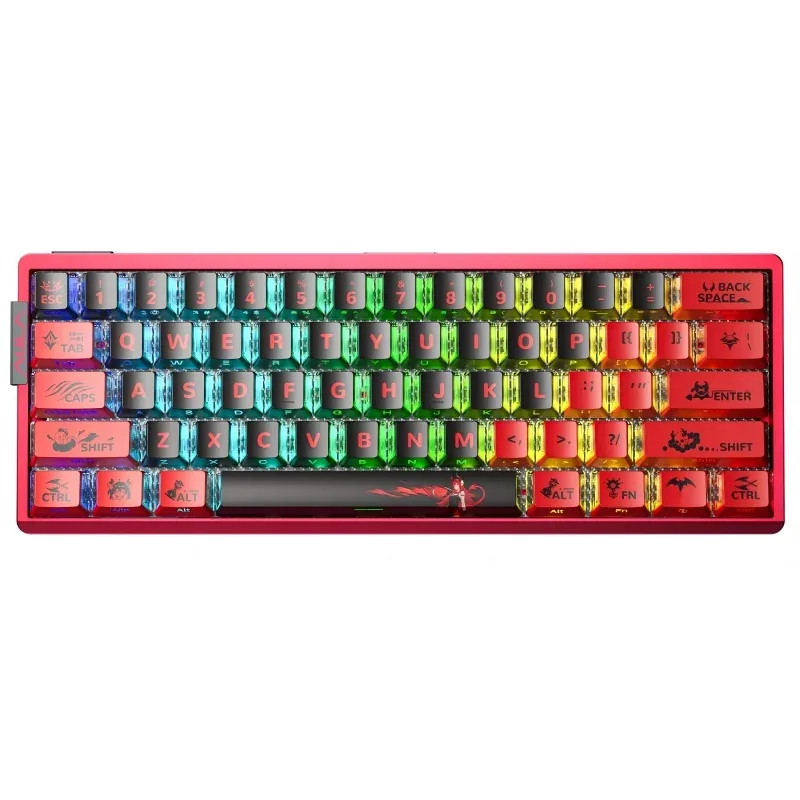
AULA AG60 Max from above: red aluminium chassis with dye-sublimated Firefly keycaps and RGB
02

Aluminium you can hear and see

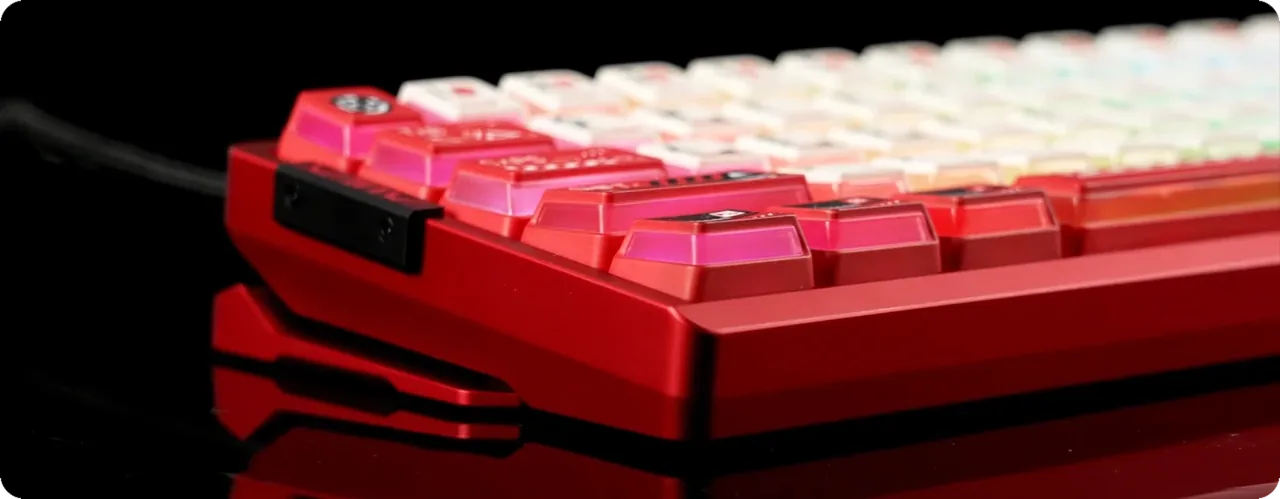
The shell is milled from a single aluminium block, then given 220-mesh anodising and a full-surface PVD coating — hence the dense matte texture and resistance to scuffs. The vacuum nano-engraved backplate catches the light. The weight and rigidity of aluminium are obvious at once: the board does not slide around the desk or flex during fast key runs.

Side profile of the AULA AG60: milled red aluminium frame and backlit keycaps
03

Five layers against a hollow sound

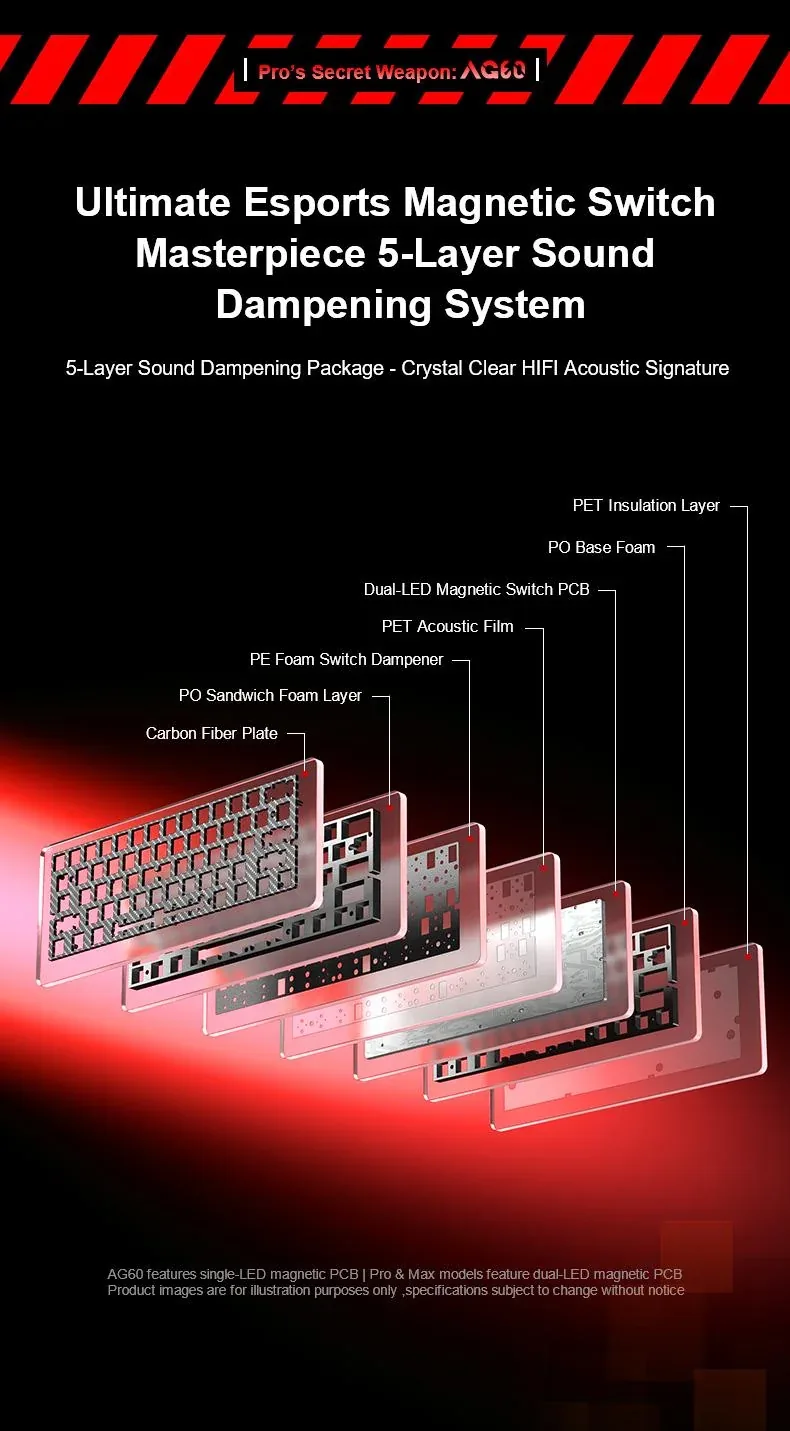
Inside sits a stack of a carbon-fibre plate, a PO foam layer, a PE dampener under the switches, a PET acoustic film, bottom PO foam and a PET insulation layer. That build kills the resonance of an aluminium box, which is what usually makes compact boards sound hollow. AULA labels every one of those layers on its own build diagram, which also shows the dual-LED per-key PCB sitting inside the stack.

The AULA AG60 five-layer dampening diagram: carbon-fibre plate, PO and PE foam, PET film, PCB and bottom insulation

Tuning in the browser, nothing to install

AULA's web driver opens straight in a browser, and FN+N calls it up from the keyboard. There you set actuation depth per key, enable Rapid Trigger, SOCD, DKS and Multi-Tasking Mode, calibrate the dead zone and build lighting scenes. Four profiles switch with FN+U, FN+I, FN+O and FN+P — handy when a shooter and plain typing want different actuation points.

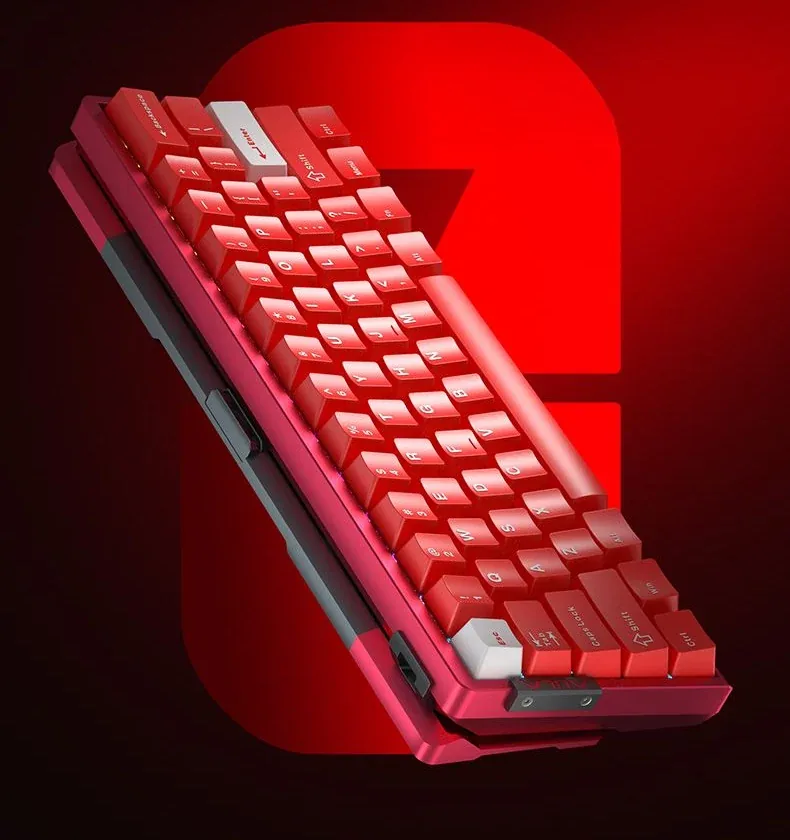
AULA AG60 at an angle, showing the depth of the aluminium case and the cable port

Two editions to choose from: Firefly and metal

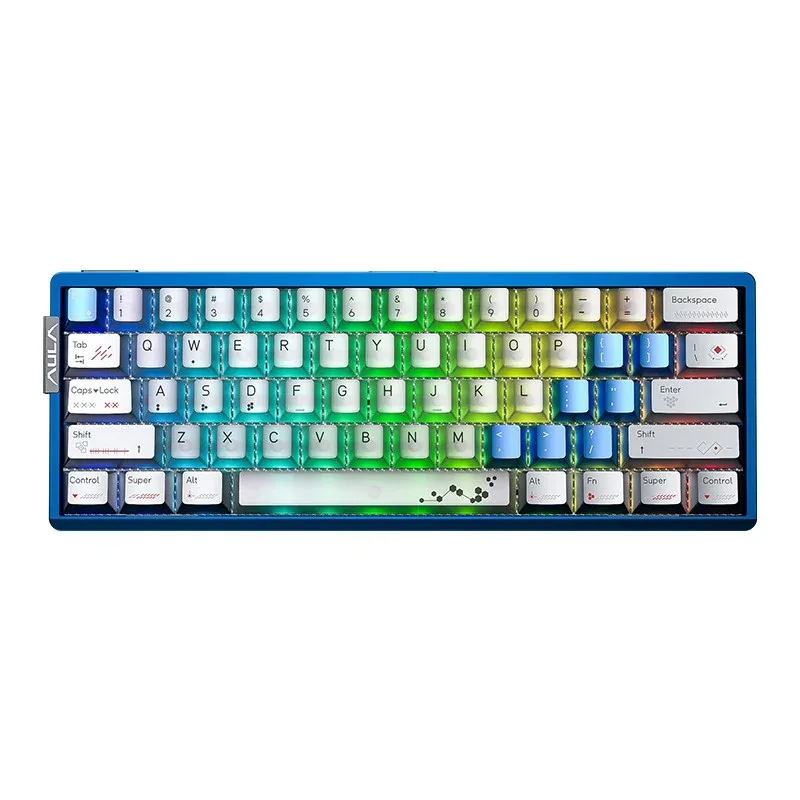
The first edition is a red chassis with Firefly keycaps: dye-sublimated artwork that lights up from below. The second is Electro Blue: an anodised blue chassis with gray and pearl-white keycaps and Godmode switches (27 gf initial, 42 gf bottom-out, 3.4 mm travel). Both are built on the same platform and differ in finish and magnetic switch type.

The AULA AG60 in Electro Blue: a blue chassis with gray and pearl-white keycaps, seen from above

Specifications

AULA AG60 Max specifications

The top configuration in the AG60 family

AULA builds the AG60 in three versions, and Max is the highest. The AG60 page states it plainly: the base AG60 uses a single-LED per-key PCB, while the Pro and Max builds use a dual-LED one. The same page quotes average latency of 0.1 ms in Pro mode and 0.08 ms in Max mode. In practice you choose Max not for a different shell but for the top electronics and firmware.

Aluminium you can hear and see

The shell is milled from a single aluminium block, then given 220-mesh anodising and a full-surface PVD coating — hence the dense matte texture and resistance to scuffs. The vacuum nano-engraved backplate catches the light. The weight and rigidity of aluminium are obvious at once: the board does not slide around the desk or flex during fast key runs.

Five layers against a hollow sound

Inside sits a stack of a carbon-fibre plate, a PO foam layer, a PE dampener under the switches, a PET acoustic film, bottom PO foam and a PET insulation layer. That build kills the resonance of an aluminium box, which is what usually makes compact boards sound hollow. AULA labels every one of those layers on its own build diagram, which also shows the dual-LED per-key PCB sitting inside the stack.

Tuning in the browser, nothing to install

AULA's web driver opens straight in a browser, and FN+N calls it up from the keyboard. There you set actuation depth per key, enable Rapid Trigger, SOCD, DKS and Multi-Tasking Mode, calibrate the dead zone and build lighting scenes. Four profiles switch with FN+U, FN+I, FN+O and FN+P — handy when a shooter and plain typing want different actuation points.

Two editions to choose from: Firefly and metal

The first edition is a red chassis with Firefly keycaps: dye-sublimated artwork that lights up from below. The second is Electro Blue: an anodised blue chassis with gray and pearl-white keycaps and Godmode switches (27 gf initial, 42 gf bottom-out, 3.4 mm travel). Both are built on the same platform and differ in finish and magnetic switch type.

This product is ordered in. Delivery is expected on 18 November 2026. GEEKSHOP confirms stock, the final price and delivery. This information is not a public offer.

Model specifications: the official AULA site

Layout
60%, 61 keys, ANSI
Switches
Magnetic, hot-swap
Polling rate
8000 Hz
Response (Max mode)
0.08 ms
Chassis
CNC aluminium
Connection
Wired, USB
Model
AULA AG60 Max
Type
Gaming keyboard with magnetic switches
Colourways
Firefly — a red chassis with dye-sublimated keycaps; Electro Blue — a blue chassis with gray and pearl-white keycaps
Switch type
Magnetic (Hall effect), contactless
Switch options
Frostcore / Godmode
Godmode: initial force
27 ±5 gf
Godmode: bottom-out force
42 ±5 gf
Godmode: total travel
3.4 ±0.1 mm
Switch swap
Full-key hot-swap, no soldering
Average response
0.08 ms in Max mode, 0.1 ms in Pro mode (AULA data)
Rapid Trigger step
0.001 mm; AULA quotes true 0.001 mm precision for Max and stepped precision for the AG60 and AG60 Pro
Chassis material
Aluminium, CNC milled
Surface finish
220-mesh anodising, PVD coating, engraved backplate
Dampening
5 layers: carbon-fibre plate, PO foam, PE dampener, PET film, bottom insulation
Lighting
Twin-Star RGB: a 130-LED matrix, a dual-LED per-key PCB and a 10-LED spacebar backlight (Pro and Max builds)
Effects
20 presets on FN+1, per-key tuning, music sync
Driver
AULA web driver in the browser, no install
Game functions
Rapid Trigger, SOCD, AD Tapping/DRT, DKS, macros, WinLock, Multi-Tasking Mode, Toggle, zero dead-zone calibration
Profiles
4 profiles, switched with FN+U/I/O/P
Video

Hear how it sounds.

Questions

The short answers.

When is delivery expected?

Delivery is expected on 18 November 2026. A pre-order locks the price and your place in the batch; GEEKSHOP confirms the exact date.

When can I get the keyboard?

The AG60 Max is sold on preorder. Once a GEEKSHOP manager confirms the order, delivery takes about a month. The manager gives the exact date at confirmation.

How are magnetic switches better than ordinary mechanical ones?

A magnetic switch has no contact pair: a Hall sensor reads the stem position. That means the actuation point can be set in software, and Rapid Trigger releases the key the moment it starts travelling back up — your character stops exactly when you lift your finger. For plain typing the difference is hard to notice; the gain shows in fast direction changes in shooters.

Can I fit different switches?

Yes. The AG60 has hot-swap sockets on every key and switches come out without soldering — AULA calls this full hybrid-switch compatibility. For this platform the company publishes the Aether, Snowglow, Godmode and Treasure magnetic switches; ask a GEEKSHOP manager which of them can be ordered.

Do I need software to configure it?

No. AULA uses a web driver that opens in a browser on your computer, with nothing to install. Settings are stored in the keyboard itself, so your profiles follow it to another PC.

Who confirms the price, stock and delivery?

GEEKSHOP confirms stock, the final price and delivery. The information on this site is not a public offer.

How do I order?

Add products to the cart and send the order — it opens in Telegram with a GeekShop manager, who confirms stock, the final price and timing. Nothing is paid on the site.

How much is delivery?

Delivery anywhere in Uzbekistan costs 50,000 UZS. The manager gives the timing when confirming the order.

How to buy

Three presses to your AULA.

Message on Telegram@geekshop_manager
  1. Cart

    Build the order on the site — or message the manager on Telegram straight away.

  2. Confirmation

    The order goes to GeekShop: a manager confirms stock, price and timing.

  3. Delivery

    Anywhere in Uzbekistan — 50,000 UZS. Payment is agreed with the manager after confirmation.

  • Orders through GEEKSHOP
  • 1-month warranty
  • Genuine, factory-sealed
  • Nothing paid on the site

Goes well with

AULA SC380 Pro
AULA SC380 Pro

Black 55g gaming mouse with PAW3311 and tri-mode connectivity

55 g and a PAW3311 sensor · Cable, receiver or Bluetooth · 500 mAh and charging-dock support

315,000 UZS In stock
AULA SC580X
AULA SC580X

Black tri-mode gaming mouse with 10–12K DPI and 6 programmable buttons

Solid shell, around 82 g · Three modes for desktop and laptop · Up to 1000 Hz and a 500 mAh battery

273,000 UZS In stock
AULA SC590 Pro
AULA SC590 Pro

Black 64g gaming mouse with PAW3311, 20K DPI and Smart Display

Mouse status on its display · Compact solid shell, about 64 g · Three connections and adjustable DPI

304,500 UZS In stock
AULA SC620
AULA SC620

Black 67g gaming mouse with PAW3311, 12K DPI and tri-mode

Honeycomb shell, 67 g · PAW3311 and accessible side buttons · 400 mAh and three ways to connect

262,500 UZS In stock
Full catalog

Your cart

Nothing here yet. Press any key — in the catalog.

Full catalog